Introduction — Why This Question Matters for Minecraft Performance
Many players assume Minecraft is an easy game to run because of its simple blocky graphics. In reality, Minecraft can be surprisingly demanding depending on your settings, mods, shaders, and hardware configuration.
If you’ve ever wondered why your FPS drops despite having a decent graphics card, or why Minecraft seems to lag even on powerful PCs, understanding whether Minecraft uses the CPU or GPU more is essential.
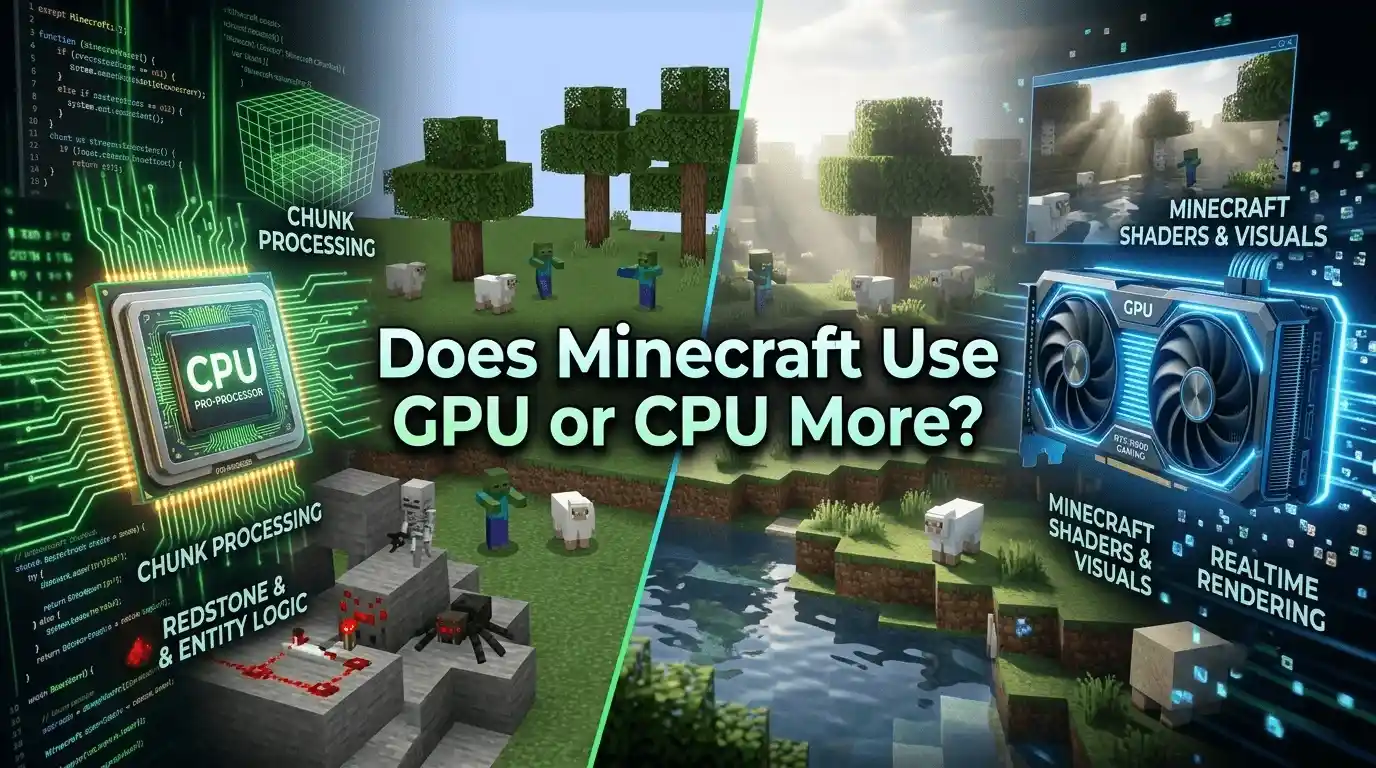
The short answer is this: Minecraft is primarily CPU-intensive, especially the Java Edition, but GPU performance becomes increasingly important with shaders, higher render distances, and visual enhancements.
In this guide, we’ll break down exactly how Minecraft uses your CPU and GPU, show realistic FPS benchmarks, explain how to fix GPU usage issues, and help you optimize performance for smoother gameplay. For more performance optimization guides, FPS breakdowns, and hardware tuning tutorials, visit our
The Ultimate Gaming Guide Hub — a complete resource for improving gaming performance across all major PC titles.
Is Minecraft CPU or GPU Intensive? — The Direct Answer
Why Minecraft Leans Heavily on the CPU
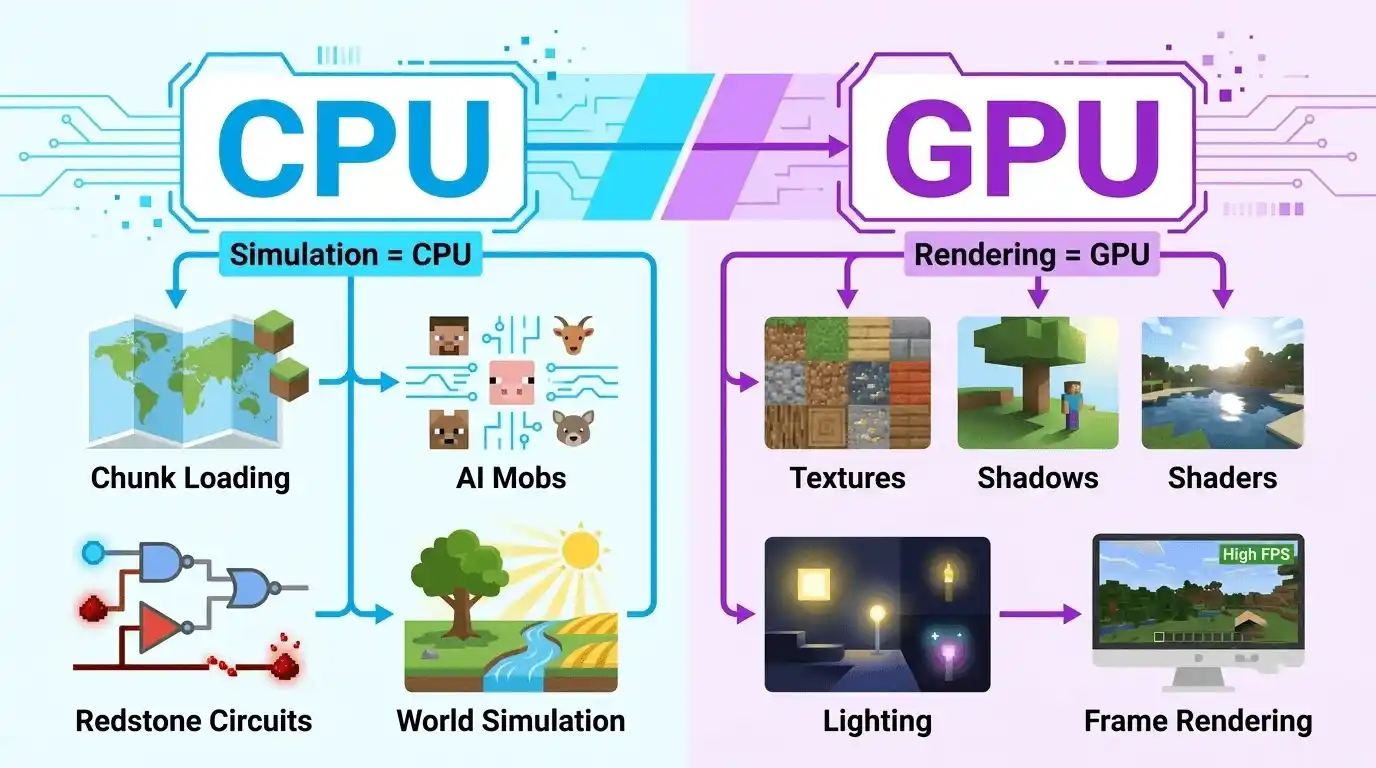
Minecraft performs a massive amount of world simulation behind the scenes. Every chunk loaded, mob spawned, redstone mechanism activated, and block updated requires CPU processing.
Key CPU-heavy tasks include:
- Chunk generation and loading
- Entity and mob AI calculations
- Redstone logic processing
- World simulation
- Physics calculations
Because of this, single-core CPU performance matters more than having many CPU cores. Minecraft Java Edition relies heavily on a few threads, making clock speed and IPC (Instructions Per Clock) extremely important.
This is why questions like “is Minecraft CPU intensive?” and “is Minecraft a CPU or GPU game?” often have the same answer: Minecraft is mainly CPU-bound.
Where the GPU Comes In
The GPU handles graphical rendering tasks such as:
- Rendering frames
- Drawing textures
- Shadow rendering
- Lighting effects
- High render distance visuals
- Shader calculations
In vanilla Minecraft, GPU usage is relatively modest. However, once you install shader packs like BSL, Sildur’s, or SEUS PTGI, GPU demand increases dramatically.
That’s why the answer to “does GPU matter for Minecraft?” is absolutely yes—especially for visual enhancements. Minecraft’s performance behavior is similar to other demanding PC titles where optimization matters a lot, such as
How Much FPS Can My PC Handle?,
which all explain how hardware bottlenecks impact real in-game performance.
Vanilla vs Modded vs Shaders — Who Uses What More?
| Scenario | Primary Load | Secondary Load | FPS Impact |
| Vanilla Minecraft (low render) | CPU | Minimal GPU | High FPS possible |
| Vanilla Minecraft (max render) | CPU + GPU | RAM | Moderate FPS drop |
| Modded Minecraft (light mods) | CPU | GPU | Noticeable CPU strain |
| Modded Minecraft (heavy mods) | CPU (heavy) | GPU | Significant FPS drop |
| Minecraft + Shaders | GPU (heavy) | CPU | Major FPS impact |
| Bedrock Edition | More balanced | GPU slightly more | Better GPU utilization |
In general:
- Vanilla Minecraft = CPU-focused
- Modded Minecraft = Even more CPU-focused
- Shaders = GPU-focused
- Bedrock Edition = Better GPU usage than Java Edition
Minecraft System Requirements — What CPU and GPU Do You Actually Need?
Official Minecraft Minimum Requirements
| Component | Minimum Spec | Recommended Spec |
| CPU | Intel Core i3-3210 / AMD A8-7600 | Intel Core i5-4690 / AMD A10-7800 |
| GPU | Intel HD 4000 / AMD Radeon R5 | NVIDIA GTX 700 Series / AMD R9 200 |
| RAM | 4GB | 8GB |
| Storage | 1GB SSD | 4GB SSD |
| OS | Windows 10 64-bit | Windows 10/11 64-bit |
Can Minecraft Run on Low-End Hardware?
Can Minecraft Run on Core i3?
Yes. Most modern Core i3 processors can easily run vanilla Minecraft at 60 FPS or higher with optimized settings.
Can Minecraft Run on Core 2 Duo?
Technically yes, but performance will be limited. Expect roughly 20–40 FPS and noticeable chunk-loading stutters.
Can Minecraft Run on a 1GB Graphics Card?
Yes, vanilla Minecraft is playable on a 1GB GPU. However, shaders and high-resolution texture packs will be extremely difficult to run smoothly.
CPU Requirements Breakdown by Use Case
| Use Case | Recommended CPU Tier | Expected FPS Range |
| Vanilla (low settings) | Dual-Core 2.5GHz+ | 60–120 FPS |
| Vanilla (max render distance) | Core i5 / Ryzen 5 | 50–90 FPS |
| Modded (30–50 mods) | Core i5 / Ryzen 5 | 40–70 FPS |
| Modded (100+ mods) | Core i7 / Ryzen 7 | 30–60 FPS |
| Shaders enabled | Core i5+ + Dedicated GPU | 20–60 FPS |
FPS Benchmarks — What FPS Will You Get in Minecraft?
Vanilla Minecraft FPS by GPU
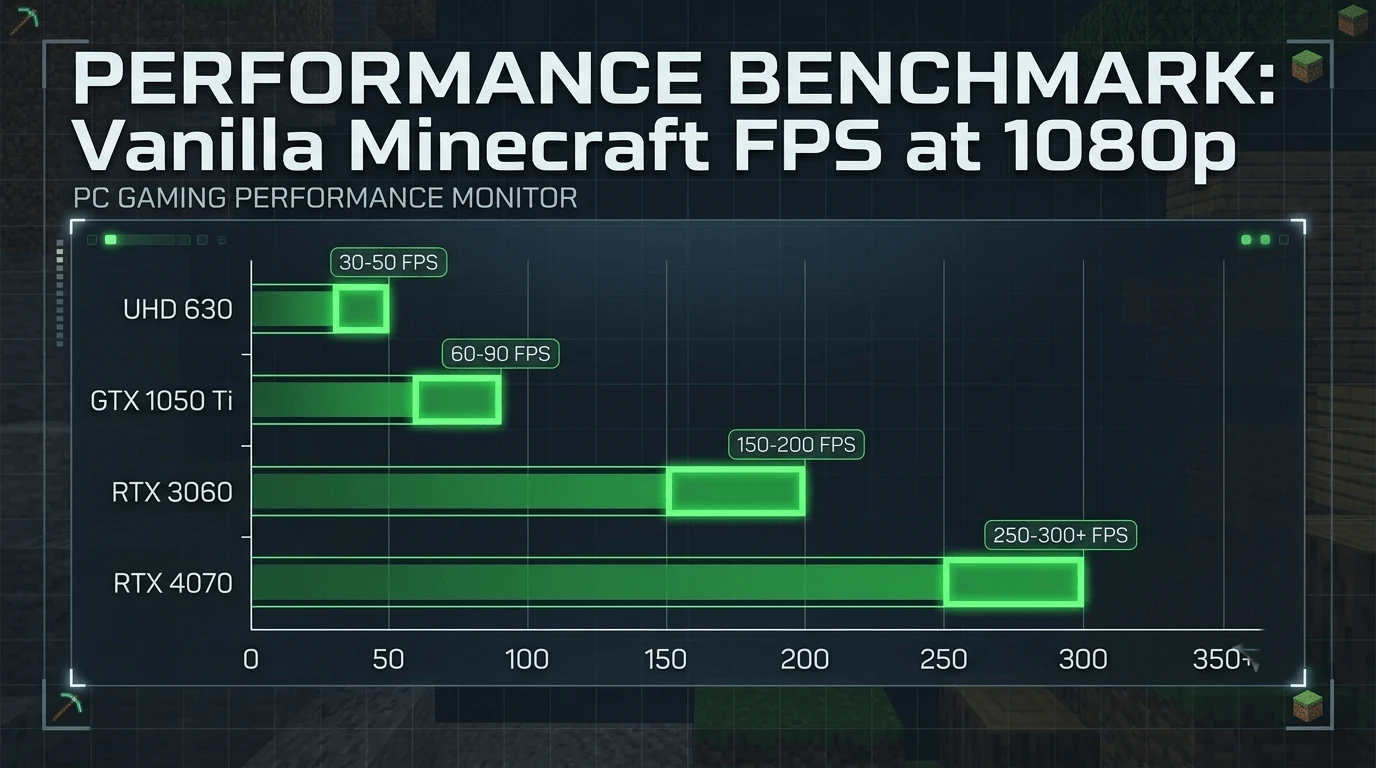
| GPU | Resolution | Render Distance | Average FPS |
| Intel UHD 630 | 1080p | 8 Chunks | 35–55 FPS |
| GTX 1050 Ti | 1080p | 12 Chunks | 80–120 FPS |
| GTX 1060 6GB | 1080p | 16 Chunks | 100–150 FPS |
| RTX 3060 | 1080p | 20 Chunks | 200+ FPS |
| RTX 4070 | 1080p | 32 Chunks | 300+ FPS |
Minecraft with Shaders FPS by GPU
| GPU | Shader Pack | Resolution | Average FPS |
| GTX 1050 Ti | Sildur’s Low | 1080p | 30–50 FPS |
| GTX 1060 6GB | BSL Medium | 1080p | 40–65 FPS |
| RTX 3060 | BSL High | 1080p | 80–120 FPS |
| RTX 4070 | SEUS PTGI | 1080p | 60–90 FPS |
Is Minecraft Heavier Than Fortnite?
Without shaders, Minecraft is generally more demanding on the CPU than Fortnite because chunk simulation and world calculations rely heavily on single-core performance.
Fortnite, meanwhile, places much greater demand on the GPU and distributes workloads more efficiently across CPU cores.
Once shaders are enabled, Minecraft’s GPU demand can become surprisingly similar to Fortnite.
Why Is Minecraft Not Using Your GPU? — Diagnosis & Fix Guide
Common Reasons Minecraft Uses Integrated Graphics Instead of Dedicated GPU
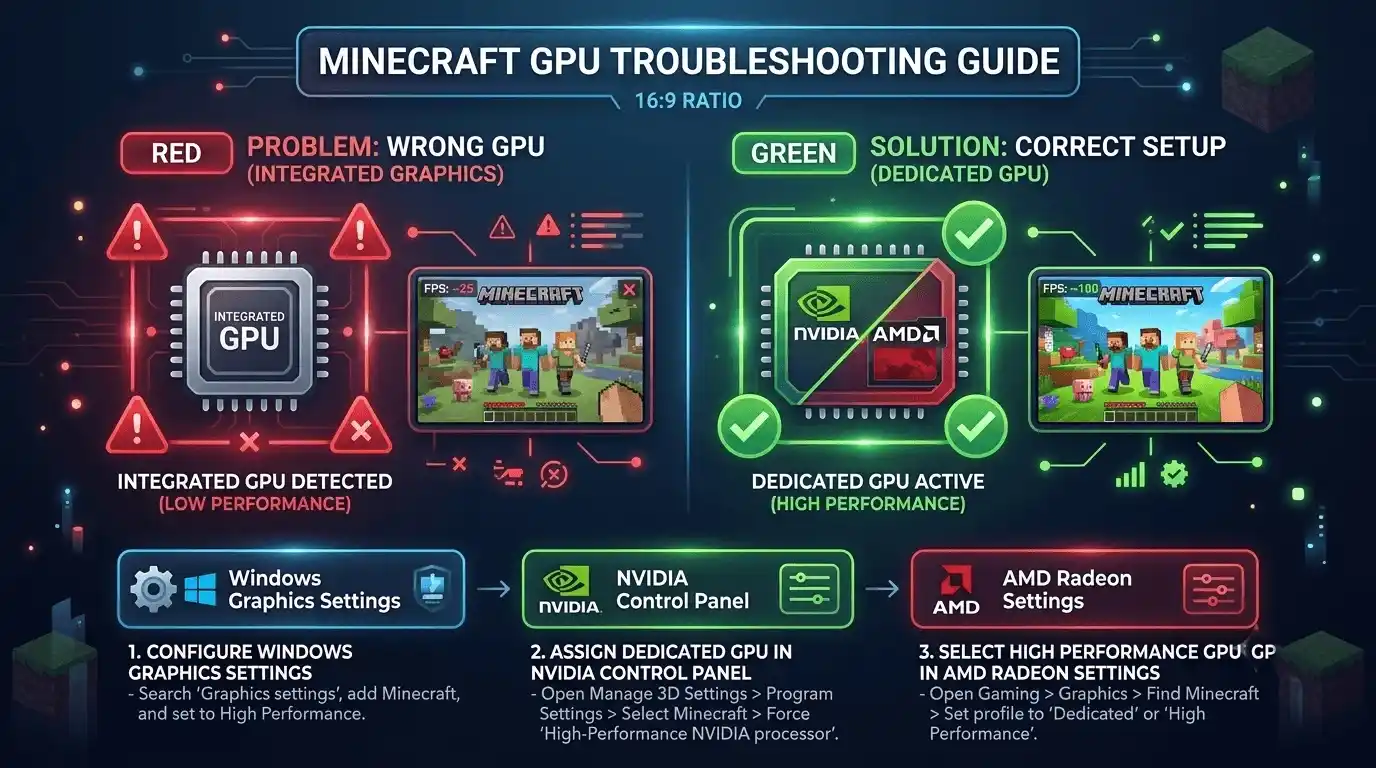
Common causes include:
- Windows selecting integrated graphics automatically
- Incorrect Java GPU assignment
- NVIDIA Control Panel settings not configured
- AMD software settings not configured
- Outdated graphics drivers
This often leads to complaints such as:
- Minecraft not using GPU
- Minecraft using integrated graphics instead of GPU
- Minecraft not using NVIDIA GPU
- Minecraft using CPU instead of GPU
How to Force Minecraft to Use Your Dedicated GPU (Step-by-Step)
Method 1 — Windows Graphics Settings
- Open Settings
- Navigate to Display → Graphics
- Add Javaw.exe or Minecraft.exe
- Select Options
- Choose High Performance
Method 2 — NVIDIA Control Panel
- Open NVIDIA Control Panel
- Select Manage 3D Settings
- Open Program Settings
- Add Minecraft or Java
- Set Preferred Graphics Processor to NVIDIA GPU
Method 3 — AMD Radeon Settings
- Open Radeon Software
- Navigate to Gaming
- Add Minecraft executable
- Set profile to Performance
How to Verify Minecraft Is Using Your GPU
Use:
- Task Manager → Performance → GPU
- MSI Afterburner
- GPU-Z
Typical usage expectations:
- Vanilla Minecraft: 30–80% GPU usage
- Shader gameplay: 80–100% GPU usage
Check Your Expected Minecraft FPS Before You Play
Why Guessing Your FPS Is a Bad Strategy
Minecraft performance depends on far more than your graphics card alone. Render distance, shader quality, Java version, RAM allocation, and mod count can dramatically affect frame rates.
Two systems with similar hardware can produce very different FPS results depending on their settings.
Instead of manually estimating performance, you can use the FPS Calculator for Low-End PC from PrimeGamesArena. It calculates your expected Minecraft FPS based on your exact CPU and GPU combination, helping you determine whether shaders, mods, or higher render distances are realistic before launching the game.
Best Minecraft Settings to Improve FPS (CPU & GPU Optimization)
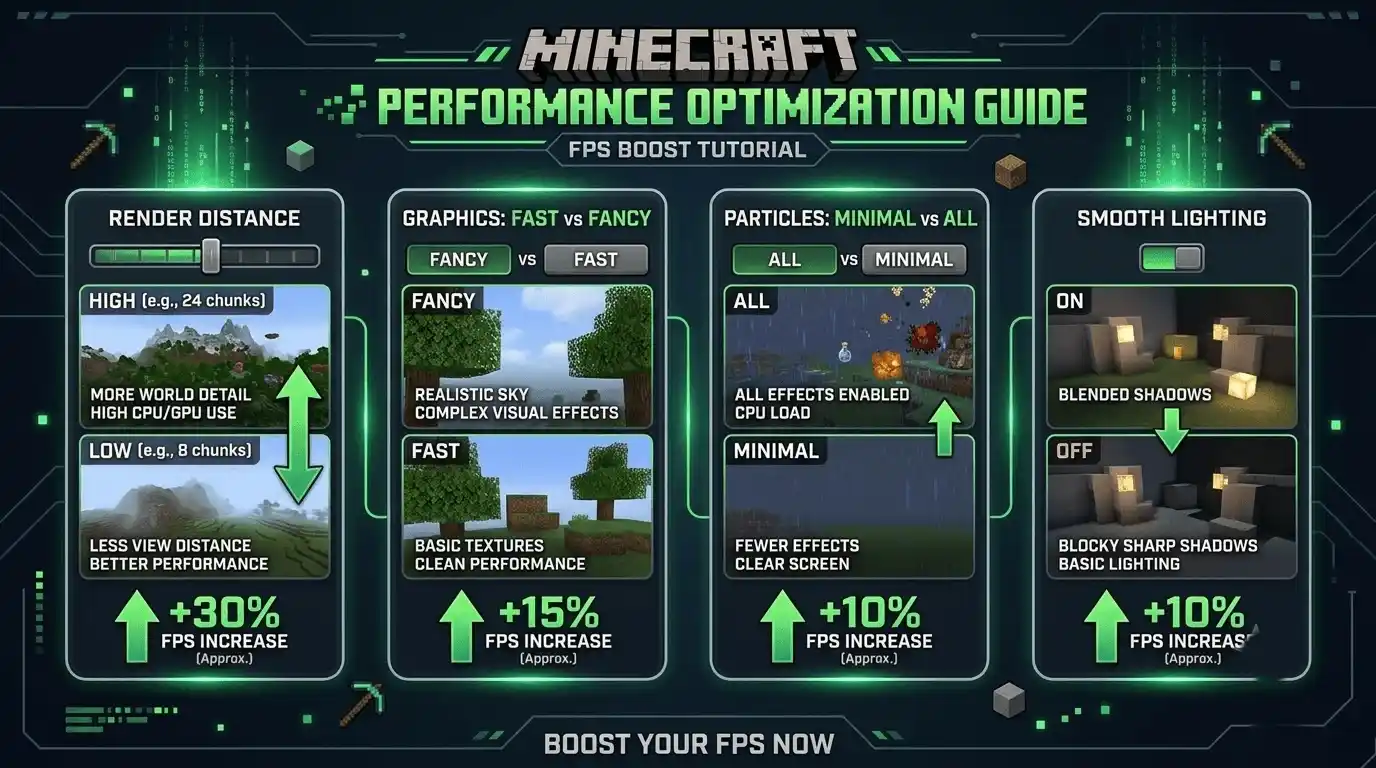
In-Game Settings That Reduce CPU Load
The biggest CPU-related FPS improvements come from:
- Lowering Render Distance
- Lowering Simulation Distance
- Reducing Entity Distance
- Disabling Fancy Graphics
- Turning off Clouds
In-Game Settings That Reduce GPU Load
For better GPU performance:
- Graphics: Fast
- Smooth Lighting: Off
- Particles: Minimal
- Sky Rendering: Off
- VSync: Off (if appropriate)
FPS Impact Table — Settings Comparison
| Setting | Default | Optimized | Estimated FPS Gain |
| Render Distance | 12 Chunks | 6 Chunks | +30–50% |
| Graphics Quality | Fancy | Fast | +15–25% |
| Smooth Lighting | Maximum | Off | +5–10% |
| Particles | All | Minimal | +3–8% |
| Entity Distance | 100% | 75% | +5–15% |
How to Make Minecraft Use More GPU (Allocate Resources Correctly)
To maximize GPU utilization:
- Ensure dedicated GPU is selected
- Install Sodium or OptiFine
- Allocate proper RAM
- Increase graphical settings slightly if CPU bottlenecked
Best Mods/Tools to Boost Minecraft FPS
Recommended optimization mods:
- Sodium
- OptiFine
- Lithium
- Starlight
- FerriteCore
Together, these mods can dramatically improve frame rates in both vanilla and modded gameplay.
Modded Minecraft — CPU vs GPU Breakdown
How Mods Shift the Hardware Balance
Most mods increase CPU load because they add:
- New entities
- Complex machines
- Additional AI routines
- Advanced world generation
Popular tech mods such as Create and Thermal Expansion are particularly CPU-intensive.
Visual mods and shaders shift more work toward the GPU.
Modded Minecraft Hardware Recommendations
| Mod Load | Recommended CPU | Recommended GPU | RAM |
| Vanilla Only | Core i3 / Ryzen 3 | GTX 1050 / RX 570 | 4GB |
| Light Mods (1–30) | Core i5 / Ryzen 5 | GTX 1060 / RX 580 | 8GB |
| Medium Mods (30–80) | Core i5 / Ryzen 5 | GTX 1660 / RX 6600 | 12GB |
| Heavy Modpacks (80–200+) | Core i7 / Ryzen 7 | RTX 3060 / RX 6700 | 16GB |
Common Minecraft FPS Issues & Fixes
FPS Drops During Chunk Loading
Cause: CPU bottleneck
Fix: Lower render distance and install Starlight.
FPS Drops When Near Many Entities/Mobs
Cause: Entity processing overload.
Fix: Lower entity distance and use Lithium.
Low FPS Even with a Good GPU
Cause: CPU bottleneck or wrong GPU selection.
Fix: Verify dedicated GPU usage.
Minecraft Using CPU Instead of GPU
Cause: Integrated graphics selected by default.
Fix: Follow the GPU force-guide above.
Low FPS with Shaders Despite Good Hardware
Cause: Heavy shader workload and VRAM limitations.
Fix: Lower shader presets or switch to Iris + Sodium.
🎯 Calculate Your Exact Minecraft FPS — [END CTA TOOL PLACEMENT]
Calculate Your Exact FPS with FPS Calculator for Low-End PC
The FPS Calculator for Low-End PC helps estimate your expected Minecraft performance based on your specific CPU and GPU combination. It’s especially useful for budget gamers, laptop users, modded Minecraft players, and anyone considering shaders.
Instead of relying on generic benchmark videos, you can get a more personalized FPS estimate and determine whether an upgrade or settings adjustment is necessary.
This can save time, prevent unnecessary purchases, and help you optimize your system more effectively.
👉 Try the FPS Calculator here: https://primegamesarena.com/fps-calculator-for-low-end-pc/
Conclusion — Does Minecraft Use GPU or CPU More?
So, does Minecraft use GPU or CPU more?
For most players, particularly those using Java Edition, Minecraft remains primarily CPU-intensive. World simulation, chunk loading, entities, and redstone mechanics all place significant demands on processor performance.
However, GPUs become increasingly important when using high render distances, texture packs, and shader mods. Bedrock Edition also utilizes graphics hardware more efficiently than Java Edition.
If you’re experiencing FPS issues, start by identifying whether you’re CPU-bound or GPU-bound, optimize your settings accordingly, and ensure Minecraft is using your dedicated graphics card.
Before making hardware upgrades or changing dozens of settings, use the FPS Calculator to estimate your expected performance and make informed optimization decisions.