Competitive FPS players spend thousands of hours refining their aim, movement, and mechanics. But one setting quietly impacts every flick shot, spray transfer, and tracking duel more than almost anything else: sensitivity.
If you’re optimizing your FPS experience further, you may also want to check What PC Parts Affect Gaming the Most? (Complete FPS Performance Guide) and How to Check If Your GPU Is Performing Well FPS & Health, which explain how hardware directly impacts competitive aiming performance.
Whether you’re grinding ranked in Valorant, climbing Premier in CS2, or fighting close-range battles in Apex Legends, your sensitivity determines how consistently you can aim under pressure. The good news is that pro players across different games tend to fall into surprisingly similar sensitivity ranges — and understanding those benchmarks can help you optimize your own setup faster.
In this guide, we’ll break down what sensitivity pro gamers actually use, explain cm/360 and eDPI, compare settings across major FPS games, and help you find the right balance for your own playstyle and hardware.
Introduction: Why Sensitivity Settings Matter in Competitive FPS
What “Sensitivity” Means in FPS Games
Sensitivity determines how far your crosshair moves based on your mouse or controller input. In PC shooters, four terms matter most:
- DPI (Dots Per Inch): Your mouse sensor sensitivity
- In-game sensitivity: Multiplier applied inside the game
- eDPI: DPI × in-game sensitivity
- cm/360: Physical mouse movement needed for one full 360° turn
Controller sensitivity works differently because it uses analog sticks instead of mouse movement.
Why Pro Sensitivity Settings Are a Benchmark for Improvement
Sensitivity optimization becomes even more effective when combined with system tuning guides like Optimize Windows 11 for Gaming FPS Boost Settings (2025) and Does Internet Speed Affect FPS? FPS vs Ping Explained, which help eliminate performance bottlenecks before adjusting aim settings.
Professional players optimize every detail of their setup. Their sensitivity settings are usually the result of years of testing, practice, and tournament-level refinement.
That doesn’t mean you should blindly copy a pro’s settings, but pro averages provide a strong baseline. If hundreds of elite FPS players independently settle around similar sensitivity ranges, there’s usually a reason.
Mouse vs Controller Sensitivity — Key Difference Established Early
Mouse players typically measure sensitivity through:
- eDPI
- cm/360
- Flick consistency
- Tracking precision
Controller players rely more on:
- Look sensitivity scale
- Response curves
- Deadzones
- Aim assist behavior
Both matter, but they use different systems.
What Is cm/360 and Why Pros Use It as a Universal Metric
What Is cm/360 — Definition and How It Is Calculated
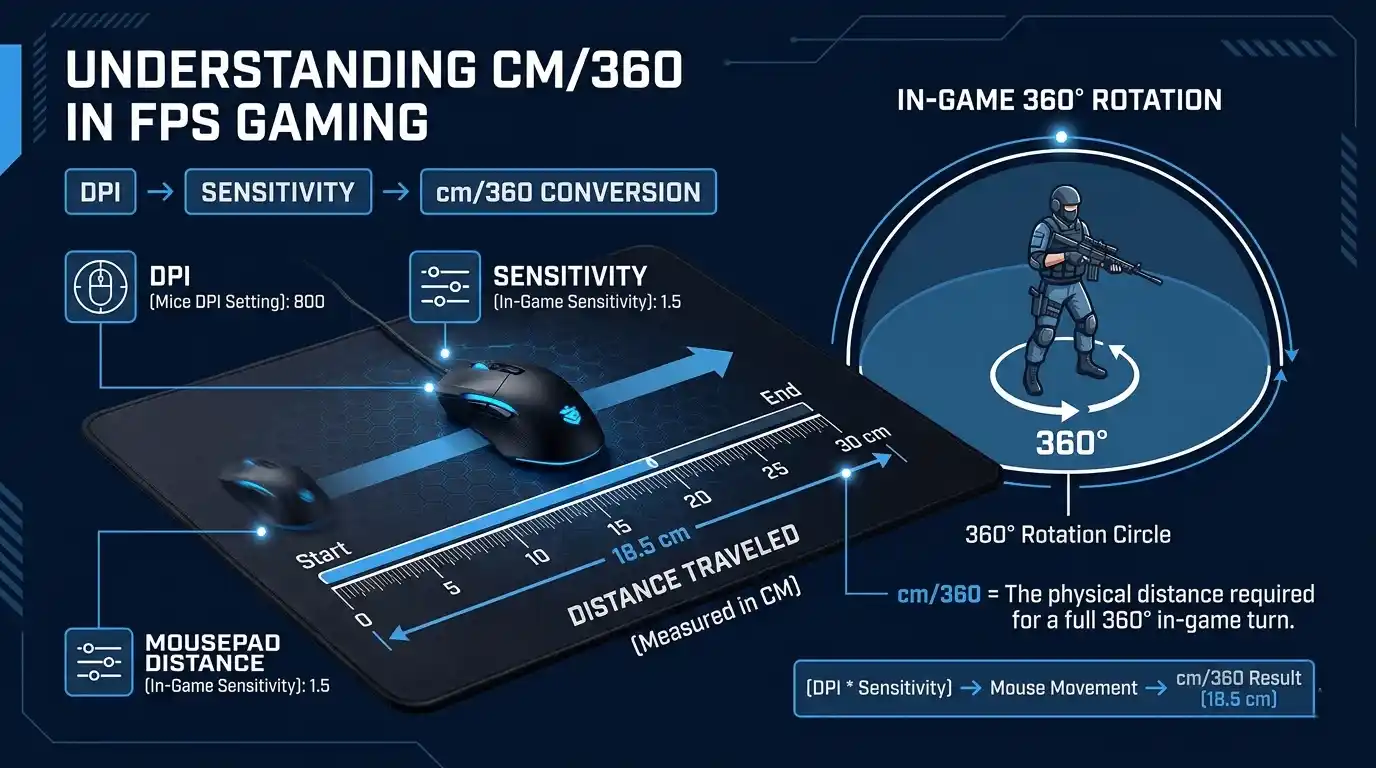
cm/360 measures how many centimeters you must physically move your mouse to complete a full 360-degree turn in-game.
The formula is:
cm/360 = \frac{2.54 \times 360}{DPI \times Sensitivity}
This metric standardizes sensitivity across all FPS games and hardware setups.
Why cm/360 Is More Meaningful Than Raw DPI or In-Game Sensitivity
DPI alone is meaningless without knowing the in-game sensitivity multiplier. A player using 400 DPI and another using 1600 DPI can end up with identical effective sensitivity.
cm/360 solves this problem by converting everything into real-world physical movement.
That is why pro players and aim trainers prefer cm/360 over raw DPI.
How to Convert Your Current Settings to cm/360
Here are some common examples:
| DPI | In-Game Sens | cm/360 |
| 400 | 1.0 | ~91 cm |
| 800 | 0.35 | ~32 cm |
| 800 | 0.50 | ~23 cm |
| 1600 | 0.30 | ~19 cm |
| 400 | 0.73 | ~31 cm |
Best cm/360 Range: What the Data Says
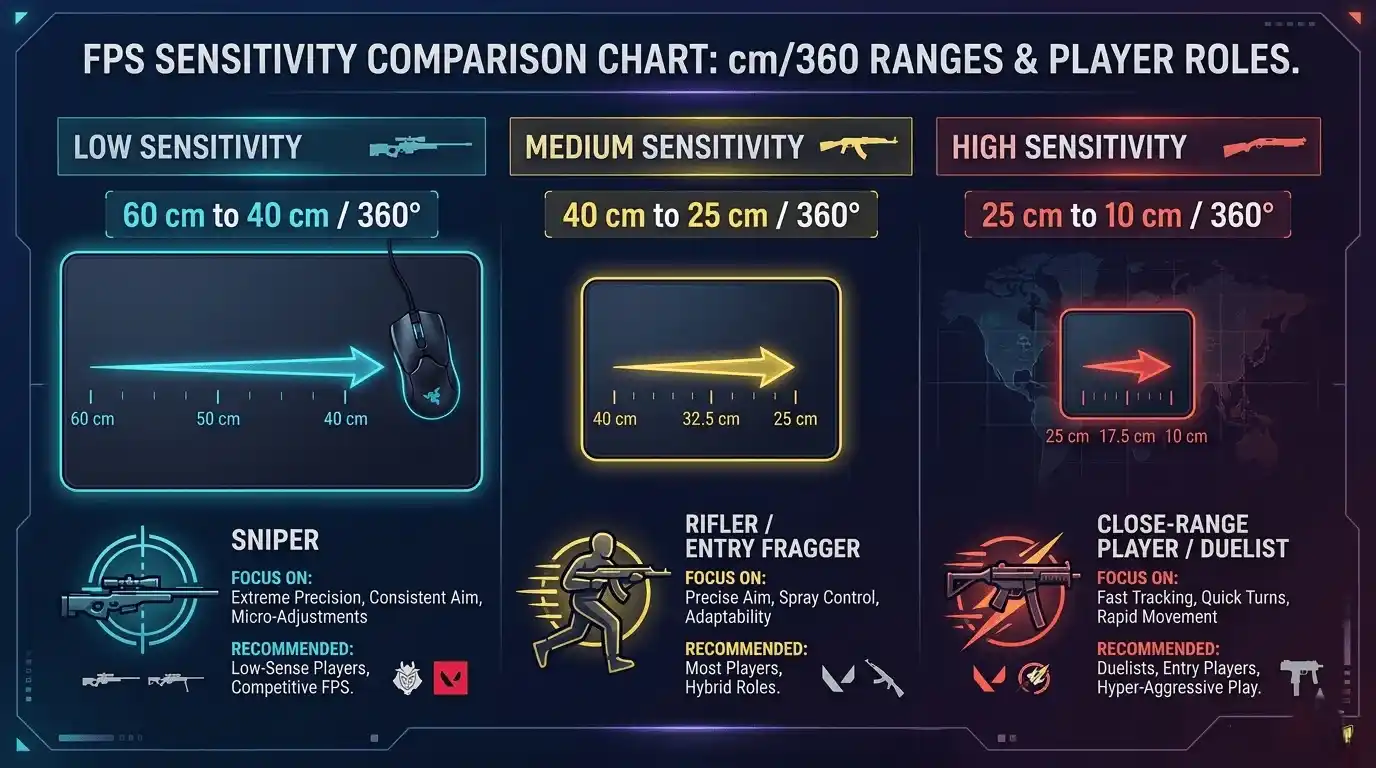
| Sensitivity Tier | cm/360 Range | Common Playstyle |
| Low (slow) | 40–60 cm | Snipers, precision aimers |
| Medium | 25–39 cm | Most Valorant/CS pros |
| High (fast) | 10–24 cm | Flick-heavy, close-range |
Most professional FPS players land somewhere between 28–40 cm/360.
Valorant Pro Sensitivity: What the Best Players Actually Use
Valorant Pro Average eDPI — What the Data Shows
Valorant pros overwhelmingly favor lower sensitivity compared to casual players.
The average pro eDPI usually sits around:
- 270–290 eDPI
- Roughly 32–38 cm/360
This allows controlled crosshair placement and precise micro-adjustments.
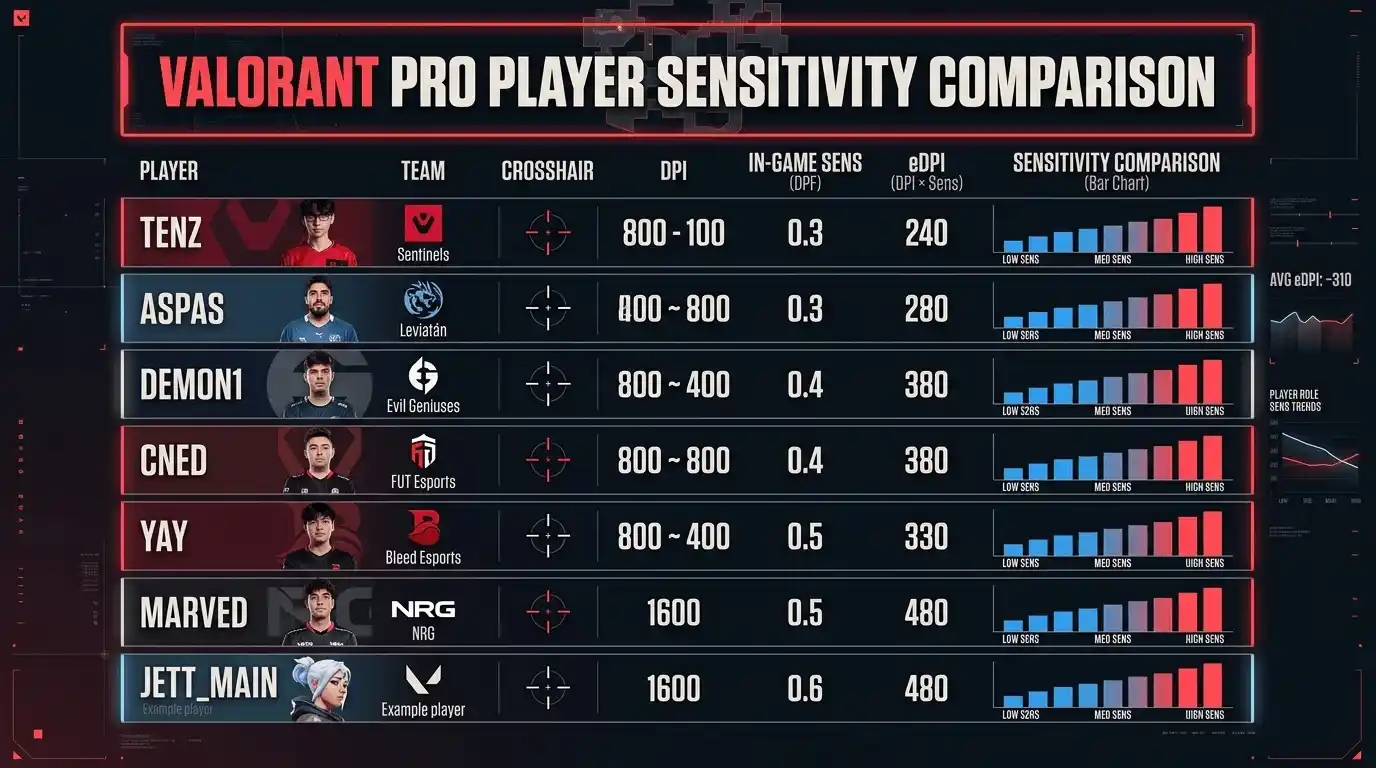
Top Valorant Pro Sensitivity Settings (Benchmark Table)
| Pro Player | DPI | In-Game Sens | eDPI | cm/360 |
| TenZ | 800 | 0.34 | 272 | ~33 cm |
| Aspas | 800 | 0.35 | 280 | ~32 cm |
| Demon1 | 800 | 0.27 | 216 | ~42 cm |
| cNed | 400 | 0.73 | 292 | ~31 cm |
| Chronicle | 800 | 0.33 | 264 | ~34 cm |
| Scene Average | — | — | ~275 | ~32–38 cm |
What Is eDPI and How to Calculate Yours
The formula is simple:
eDPI = DPI \times In\text{-}Game\ Sensitivity
eDPI is popular because it’s quick to compare across players inside the same game.
Should You Copy Pro Valorant Sensitivity Settings Exactly?
Not necessarily.
Your ideal sensitivity depends on:
- Mousepad size
- Desk space
- Arm vs wrist aiming
- Monitor refresh rate
- FPS stability
A pro setup built around 240Hz gameplay and a large mousepad may feel terrible on a cramped 60Hz setup.
Use pro sensitivity as a benchmark — not a strict rule.
CS2 / CS:GO Pro Sensitivity: cm/360 Benchmarks Across the Scene
For players looking to upgrade their competitive setup further, you can also explore Is a Gaming PC Better Than PS5 FPS Comparison 2026 and DOOM PS4 Review: Is It Still Worth Playing in 2025?, which highlight how hardware and game optimization affect responsiveness in fast-paced shooters.
CS:GO Pro cm/360 Averages — Historical and Current Data
Counter-Strike has historically favored lower sensitivity.
Most professionals play within:
- 30–40 cm/360
- 400 DPI as a common baseline
This prioritizes precision over speed.
CS:GO Pro Sensitivity Benchmark Table
| Pro Player | DPI | In-Game Sens | cm/360 | Role |
| s1mple | 400 | 3.09 | ~21 cm | AWPer/Rifler |
| ZywOo | 400 | 2.00 | ~32 cm | AWPer |
| NiKo | 400 | 1.49 | ~43 cm | Rifler |
| device | 400 | 1.60 | ~40 cm | AWPer |
| sh1ro | 400 | 1.85 | ~35 cm | AWPer |
How CS:GO cm/360 Values Compare to Valorant Pros
Despite different engines and mechanics, both games converge around similar physical movement ranges.
That consistency is one reason cm/360 remains such a valuable metric.
Why AWPers Typically Use Lower Sensitivity Than Riflers
AWPers benefit from:
- Slower crosshair control
- More precision while scoped
- Reduced overflicking
Riflers often use slightly faster sensitivity for close-range fights and fast transfers.
How to Find Your Ideal Sensitivity Based on Pro Benchmarks
If you’re unsure whether your system can support stable competitive performance, tools like How Much FPS Can My PC Handle? and What FPS Can I Get on My PC? — How to Check, Estimate & Boost Your Frame Rate can help you understand your actual in-game performance before fine-tuning sensitivity.
Step-by-Step: Using Pro Data to Set Your Own Sensitivity
- Identify your game and role
- Calculate your current cm/360
- Compare it to pro averages
- Adjust sensitivity slowly (10–15% max)
- Commit to the new setting for at least 2 weeks
Consistency matters more than endless tweaking.
Why FPS Stability Matters Before You Adjust Sensitivity
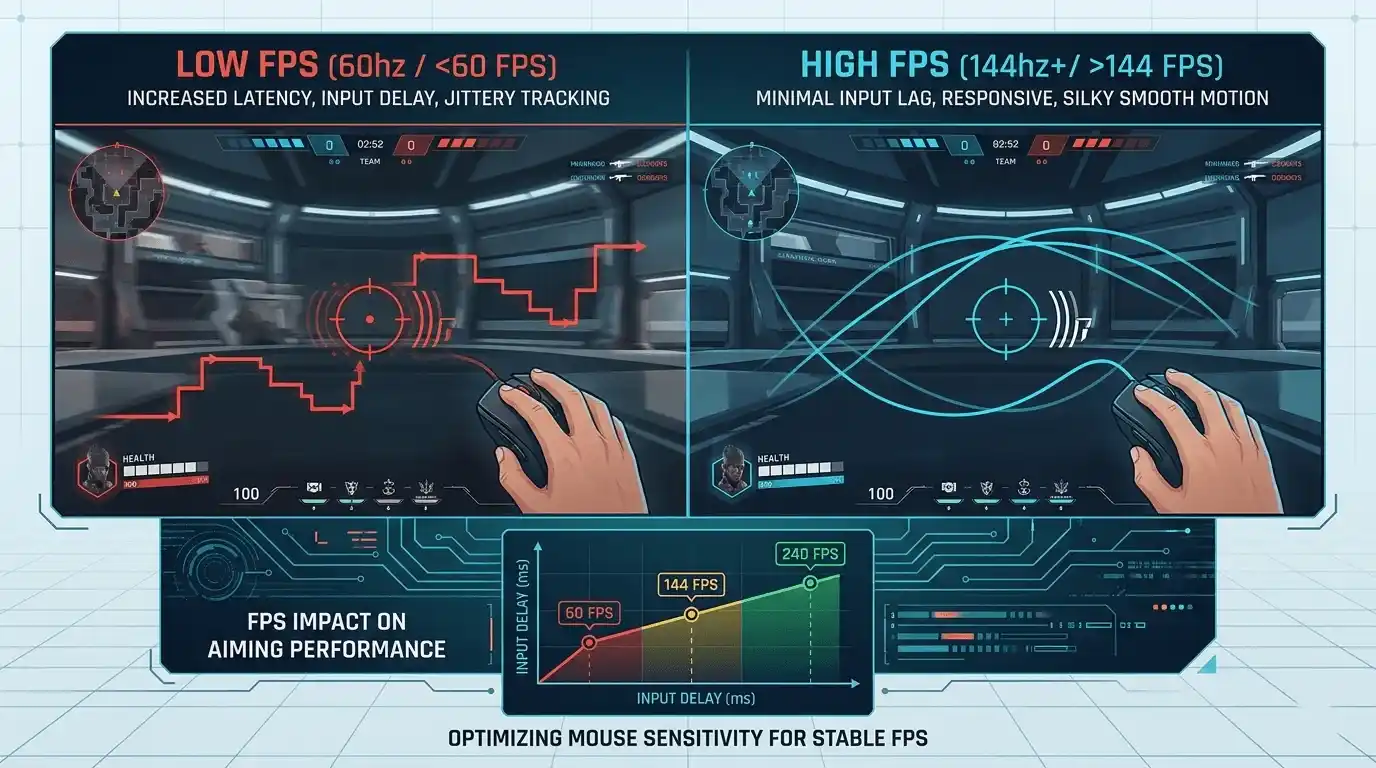
Low FPS can make perfectly good sensitivity settings feel awful.
At unstable frame rates, mouse input feels inconsistent because:
- Frame pacing changes
- Input latency increases
- Tracking becomes harder
Most pros play at 240fps or higher with extremely stable frame delivery.
Check Your PC’s FPS Performance Before Adjusting Sensitivity
Before blaming your sensitivity, verify your hardware is delivering stable performance.
Instead of manually estimating, you can use the Prime Games Arena FPS Calculator — it calculates your expected FPS based on your exact GPU and CPU specs. This helps you understand whether your system can realistically maintain competitive frame rates before changing your sensitivity setup.
→ https://primegamesarena.com/fps-calculator-for-low-end-pc/
Pro Sensitivity Across Popular FPS Games — Cross-Game Comparison
Average Pro eDPI and cm/360 by Game
| Game | Avg Pro eDPI | Avg cm/360 | Notes |
| Valorant | ~270–290 | ~32–38 cm | Low sens dominant |
| CS2 / CS:GO | ~800–1000 | ~30–40 cm | Role-dependent variance |
| Apex Legends (PC) | ~1400–1800 | ~20–30 cm | Faster pace, higher sens |
| Overwatch 2 | ~500–700 | ~28–36 cm | Hero-dependent |
| Fortnite | ~600–900 | ~25–35 cm | Build mode affects preference |
| Rainbow Six Siege | ~400–600 | ~35–50 cm | Slow-paced, precision-heavy |
Key Takeaway: Why cm/360 Converges Across Games Despite Different eDPI
Human motor control tends to settle within similar physical movement ranges.
That is why pro players across multiple FPS games consistently land near the same cm/360 windows even when the raw sensitivity numbers look completely different.
Best Apex Legends Controller Settings — Pro and Community Benchmarks
Why Controller Sensitivity Works Differently Than Mouse Sensitivity
Controller aiming is shaped heavily by:
- Response curves
- Deadzones
- Stick acceleration
- Aim assist
Two common response curves are:
- Classic: Slower near center, easier for beginners
- Linear: Direct 1:1 input preferred by advanced players
Best Sensitivity for Apex Controller — Pro-Recommended Values
Most Apex controller pros use:
- Look sensitivity: 4–5
- ADS multiplier: 1.0–1.2
- Deadzone: Small or None
Best Apex Legends Controller Settings — Full Recommended Config Table
| Setting | Beginner | Competitive | Pro-Level |
| Look Sensitivity | 3 | 4–5 | 4–6 |
| ADS Sensitivity Multiplier | 1.0 | 1.0–1.2 | 1.0–1.3 |
| Response Curve | Classic | Classic | Linear |
| Deadzone | Default | Small | None / Custom |
| Inverted Look | Off | Off | Off |
| Button Layout | Default | Bumper Jumper | Bumper Jumper / Evolved |
Best Apex Settings for Controller Beyond Sensitivity
Additional important settings include:
- Button layout: Bumper Jumper or Evolved
- Aim assist: Keep Standard enabled
- Crouch behavior: Toggle recommended
- FPS stability: Critical for smooth aim assist behavior
Common Sensitivity Mistakes and How Pros Avoid Them
Changing Sensitivity Too Often — The Consistency Trap
Muscle memory develops slowly.
Most players sabotage improvement by constantly switching settings every few days.
Copying a Pro’s Sensitivity Without Matching Their Hardware Setup
A pro playing on:
- 240Hz
- 300fps
- XL mousepad
- Lightweight mouse
…has a completely different aiming environment than a casual player on 60Hz hardware.
Using High Sensitivity to Compensate for Low FPS
High sensitivity may feel more responsive temporarily, but it usually reduces precision.
Fix performance issues first.
Ignoring Mousepad Size When Choosing a cm/360 Target
Low sensitivity requires physical space.
A 40 cm/360 setup on a tiny mousepad simply won’t work properly.
Calculate Your Expected FPS — Know If Your PC Can Keep Up
Why FPS Is the Foundation of Good Aim — Not Just Sensitivity
At 60fps, each frame lasts roughly 16.6ms.
At 144fps, frame times drop dramatically, making aiming smoother and more responsive.
The same sensitivity can feel completely different depending on frame rate consistency.
Calculate Your Exact FPS with the Prime Games Arena FPS Calculator
The Prime Games Arena FPS Calculator estimates your expected FPS using your exact GPU and CPU combination. It helps competitive players determine whether their hardware can realistically support the smooth frame rates required for precise aiming.
This is especially useful for:
- Valorant players targeting 240fps
- CS2 players optimizing frame pacing
- Apex players troubleshooting inconsistent aim
Sensitivity optimization works best when paired with stable performance.
👉 Try it free: https://primegamesarena.com/fps-calculator-for-low-end-pc/
Final Verdict: What Sensitivity Should You Actually Use?
For more advanced gaming optimization strategies, FPS guides, and performance breakdowns, explore our main resource hub:
The Ultimate Gaming Guide Hub, where competitive players can find detailed insights on FPS, settings, and system optimization across all major games.
Summary of Pro Sensitivity Benchmarks by Game
- Valorant: ~32–38 cm/360
- CS2: ~30–40 cm/360
- Apex Legends: ~20–30 cm/360
- Rainbow Six Siege: ~35–50 cm/360
The Right Starting Range for Most FPS Players
For most mouse players:
- Start around 28–38 cm/360
- Adjust slowly from there
For controller players:
- Sensitivity 4
- Classic response curve
- ADS multiplier 1.0
…is a reliable baseline.
Use cm/360 as Your Compass, Not eDPI Alone
eDPI changes from game to game.
cm/360 remains the most consistent way to compare sensitivity across titles.
One Closing Thought: Sensitivity and FPS Are Inseparable
The best sensitivity in the world will still feel inconsistent on unstable hardware.
Professional aim isn’t only about mechanics — it’s also about smooth frame delivery, low latency, and consistent performance. Optimize both your FPS and your sensitivity together for the best competitive results.