If you play FPS games like Valorant, Counter-Strike 2, Call of Duty: Warzone 2.0, or Apex Legends, your mousepad affects more than just comfort. It directly influences mouse tracking accuracy, aim consistency, flick precision, and overall competitive performance.
A gaming mousepad will not increase your GPU frame rate or magically boost your PC hardware. However, it can dramatically improve how accurately your mouse sensor performs — especially in competitive FPS gaming where small aiming inconsistencies decide fights.
For many gamers, a mousepad is one of the cheapest and highest-impact upgrades available.
Does a Mousepad Actually Matter for Gaming?
Quick answer — yes, and here is what specifically changes
A quality mousepad improves:
- Sensor tracking consistency
- Mouse glide smoothness
- Aim stability
- Flick-shot precision
- Micro-adjustments during aiming
- Comfort during long gaming sessions
Modern gaming mice are designed to perform best on optimized surfaces. A rough desk, glossy table, or uneven surface can interfere with tracking and create inconsistent mouse movement.
For casual gaming, the difference may feel subtle. For competitive FPS players, the difference is immediate.
Who this guide is for — casual gamers, FPS players, and competitive players
This guide is useful for:
- Casual PC gamers wondering if mousepads matter
- FPS players improving aim consistency
- Low-sensitivity gamers needing smoother tracking
- Competitive players comparing cloth vs hard pads
- Budget gamers optimizing performance without upgrading hardware
What this article covers — tracking, aim, performance, and product picks
We’ll break down:
- Mousepad vs no mousepad performance
- FPS gaming impact
- Cloth vs hard pads
- Artisan mousepads
- Best gaming mousepads in 2025
- Common mistakes hurting aim performance
Mousepad vs No Mousepad — What Is the Real Difference?
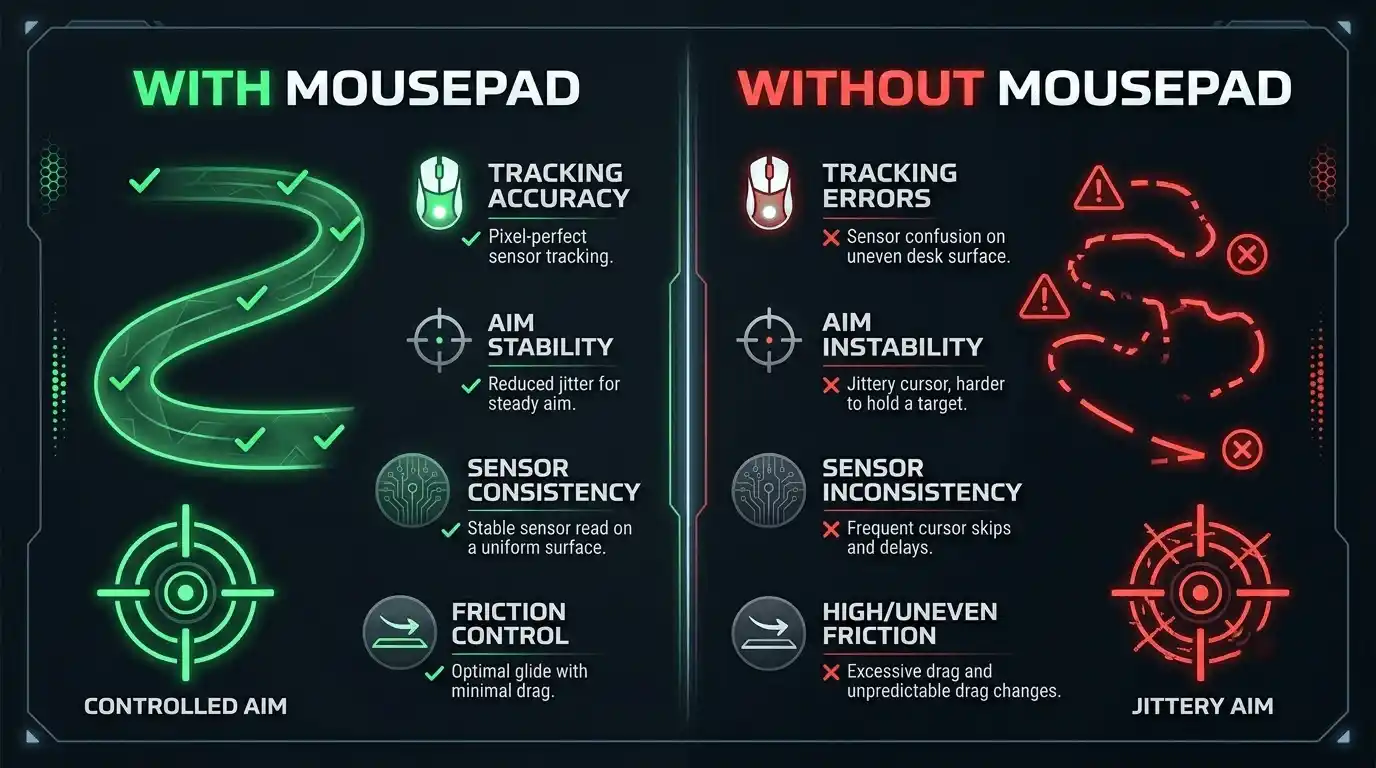
How surface type directly affects mouse sensor tracking accuracy
Gaming mouse sensors rely on surface texture to interpret movement accurately. Mousepads provide a controlled surface optimized for optical and laser sensors.
Bare desks create problems such as:
- Uneven friction
- Reflection issues
- Inconsistent texture
- Sensor skipping
- Faster wear on mouse feet
A proper gaming mousepad gives your sensor a predictable surface, improving movement accuracy and consistency.
Consistent glide vs unpredictable friction on a bare desk
One major difference is glide consistency.
On a gaming mousepad:
- Mouse movement feels controlled and smooth
- Friction stays predictable
- Flicks and tracking remain stable
On a desk:
- Certain spots feel slower or faster
- Dust and oils increase friction
- Tracking becomes inconsistent over time
This matters heavily in tactical FPS games where muscle memory is critical.
Does a mousepad affect aim — direct answer with real context
Yes, a mousepad directly affects aim quality.
It does not make you instantly better, but it removes inconsistencies that hurt precision. Competitive players spend years building muscle memory. An inconsistent surface destroys that consistency.
Mousepad vs No Mousepad Comparison
| Factor | With Mousepad | Without Mousepad | Impact on Gaming |
| Tracking accuracy | High | Inconsistent | Better aim stability |
| Surface friction | Controlled | Variable | Improved speed control |
| Sensor performance | Optimized | Degraded | Higher precision |
| Desk protection | Yes | No | Reduced wear |
| Glide consistency | Smooth | Unpredictable | Better flick accuracy |
How a Mousepad Affects FPS Gaming Performance
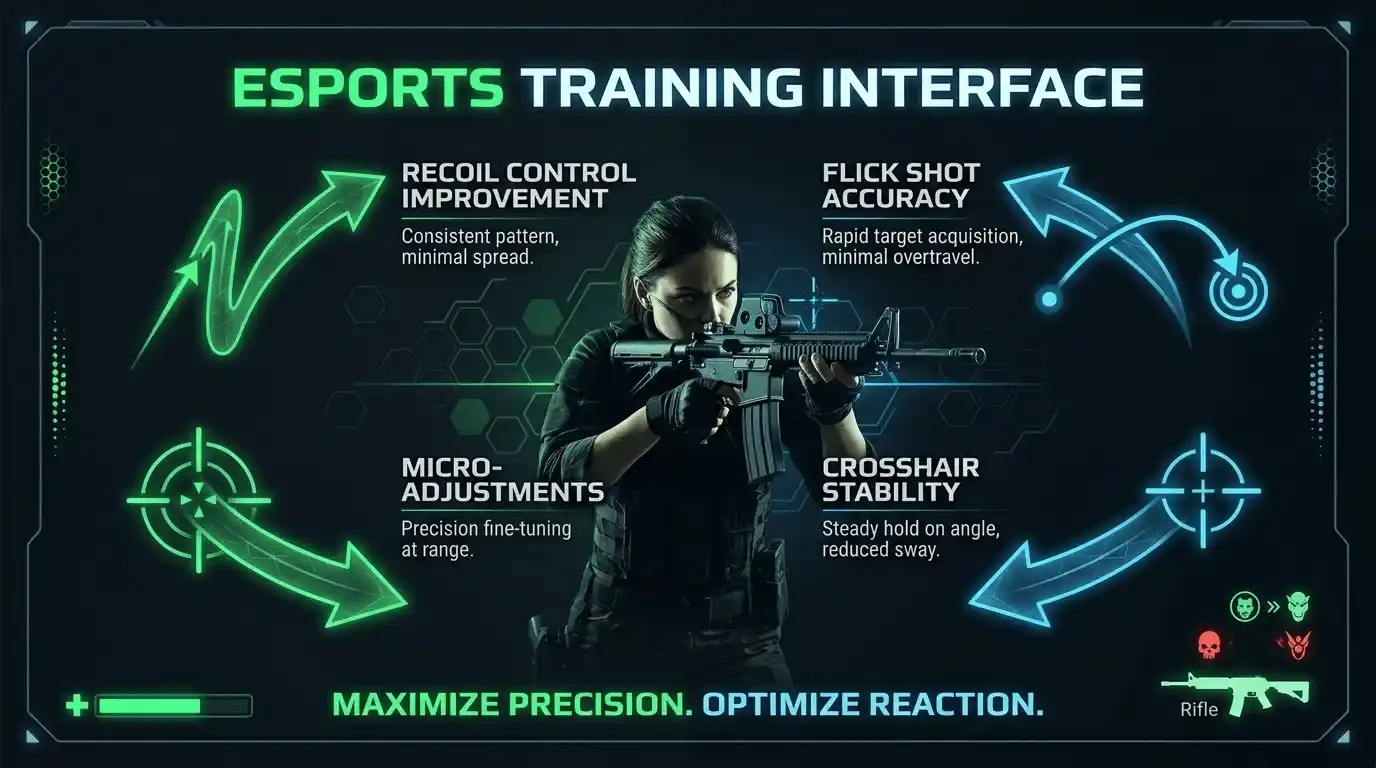
Mouse tracking accuracy and its direct effect on aim in FPS games
In FPS titles, tiny tracking inconsistencies can ruin aim.
A stable mousepad helps with:
- Recoil control
- Crosshair placement
- Flick shots
- Target tracking
- Micro-adjustments
This becomes especially noticeable in low time-to-kill shooters like Valorant and Counter-Strike 2.
Does mousepad matter for Valorant — what competitive players experience
Professional FPS players rarely use random desk surfaces.
Most use premium cloth mousepads because:
- They provide better stopping power
- Tracking feels more consistent
- Low-sensitivity arm movements become smoother
Games like Valorant demand precise headshots. Even small inconsistencies become noticeable during competitive play.
Surface texture (cloth vs hard) and how it syncs with DPI and polling rate
Different surfaces interact differently with your mouse settings.
- Cloth pads → more control and stopping power
- Hard pads → faster glide and quicker flicks
- Hybrid pads → balanced speed and control
Higher DPI combined with ultra-fast pads can reduce precision for tactical FPS players. Low-sensitivity gamers usually benefit more from large cloth pads.
Real-world impact — does a mousepad change in-game FPS numbers or only aim quality
A mousepad does not increase GPU FPS output or improve rendering performance.
However:
- Better tracking improves competitive consistency
- Stable aim improves reaction efficiency
- Smoother glide reduces overcorrection
In practical terms, your gameplay performance improves even though your frame rate remains unchanged.
Is a Mousepad Necessary for Gaming — Breaking It Down by Use Case
Do you need a mousepad for casual gaming
For casual players, a mousepad is recommended but not mandatory.
You gain:
- Better comfort
- Smoother movement
- Less desk wear
Even affordable cloth pads improve the experience noticeably.
Do you need a mousepad for competitive FPS gaming
For competitive FPS gaming, a mousepad is essential.
Competitive aiming depends on:
- Muscle memory
- Stable friction
- Reliable tracking
Without a consistent surface, aim quality suffers.
Do you need a mouse mat for mixed console and PC setups
For mixed setups, mousepads mainly provide:
- Comfort
- Desk protection
- Cleaner setup aesthetics
Performance benefits matter more for PC shooters than console gaming.
Mousepad Necessity by Gamer Type
| Gamer Type | Mousepad Necessary? | Why | Recommended Type |
| Casual gamer | Recommended | Comfort + tracking | Budget cloth |
| Competitive FPS player | Essential | Aim consistency | Premium cloth / Artisan |
| Low-end PC gamer | Yes | Maximizes peripheral performance | Large cloth pad |
| Console + PC hybrid | Optional | Mostly desk protection | Desk mat |
| Mobile/laptop gamer | Recommended | Better tracking | Compact cloth pad |
Your Mousepad Is One Piece of the FPS Puzzle
Once you understand how peripherals affect aim, you can measure your actual system performance using our What FPS Can I Get on My PC guide and calculator tool, which helps estimate real in-game frame rates before upgrading hardware
Other hardware factors that affect your actual in-game frame rate
Your mousepad improves aiming performance, but actual FPS output still depends on hardware.
Major FPS factors include:
- GPU power
- CPU performance
- RAM speed
- Storage type
- Cooling and thermals
GPU, CPU, and RAM — how they combine with your peripheral setup for real FPS output
Many gamers underestimate memory performance, but RAM can directly influence gaming smoothness, stutters, and FPS stability — especially in competitive titles.
For example:
- A weak CPU can bottleneck high-refresh gaming
- Insufficient RAM causes stuttering
- Older GPUs struggle at high settings
Your peripherals improve control, but your hardware determines actual frame rate.
If you want to improve FPS beyond hardware limitations, optimizing your system can make a noticeable difference, especially with our Windows 11 gaming optimization guide for FPS boost settings (2025).
👉 Your mousepad improves aim consistency — but is your GPU and CPU actually delivering the frame rate needed to make that count? Instead of guessing, use the Prime Games Arena FPS Calculator to check your expected FPS based on your hardware: Prime Games Arena FPS Calculator
Best Mousepad Types for Gaming — Cloth, Hard, and Hybrid Explained
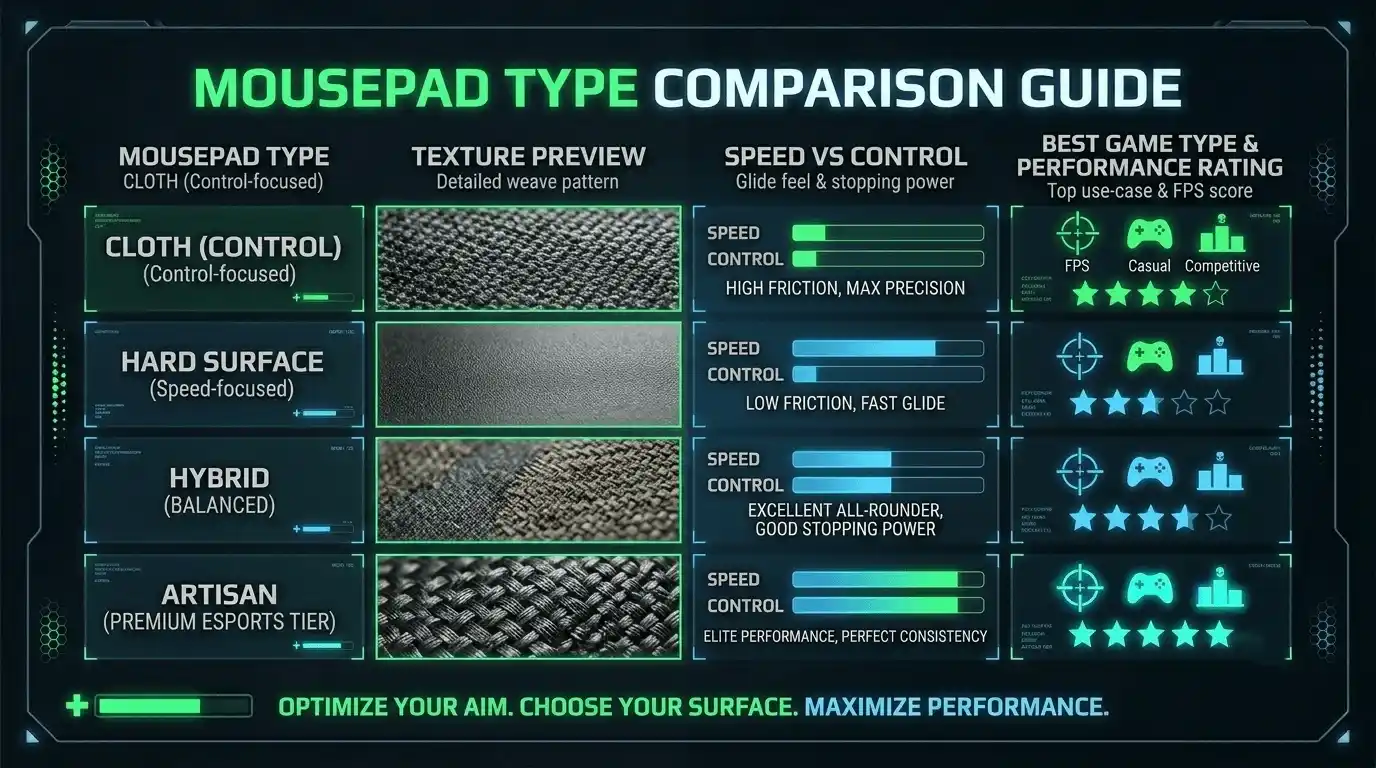
Cloth mouse pads — best for control, aim, and FPS accuracy
Cloth pads remain the most popular choice for FPS gaming because they offer:
- Better stopping power
- More control
- Stable glide
- Comfortable feel
They are ideal for tactical shooters and precision aiming.
Hard and hybrid mouse pads — speed-focused, low-friction glide
Hard pads prioritize speed.
Benefits include:
- Faster flicks
- Lower friction
- Easy cleaning
However, some players lose precision because stopping becomes harder.
Mousepad size guide — small vs large vs XL desk mat and what each suits
- Small pads → high-sensitivity players
- Large pads → low-sensitivity FPS players
- XL desk mats → full desk coverage and wide arm movement
Low-sensitivity FPS gamers usually benefit most from XL pads.
Mousepad Type Comparison for FPS Gaming
| Type | Surface Feel | Best For | FPS Gaming Impact | Popular Examples |
| Cloth | Controlled | Precision aim | High | SteelSeries QcK, HyperX Fury S |
| Hard plastic | Fast | Flick-heavy gameplay | Medium | Razer Sphex |
| Hybrid | Balanced | All-round gaming | Medium-High | Logitech G440 |
| Artisan | Customizable | Competitive FPS | Very High | Artisan Hien, Zero |
| Desk mat | Varies | Full desk setups | Depends on material | Corsair MM300 |
Artisan Mousepads — Are They Worth It for FPS Gaming?
What makes Artisan mousepads different — surface texture, materials, and build quality
Artisan mousepads are considered premium because of:
- High-quality Japanese manufacturing
- Unique surface textures
- Exceptional durability
- Advanced glide-control balance
Many competitive players consider them endgame mousepads.
Artisan mousepad lineup overview — Hien, Raiden, Zero, and FX series
Popular Artisan models include:
- Hien → balanced speed/control
- Raiden → extremely fast glide
- Zero → precision-focused control
- Hayate Otsu → hybrid feel
Each surface targets different aiming preferences.
Artisan mousepad vs mainstream alternatives — real performance comparison for FPS
Compared to mainstream pads, Artisan models often provide:
- More consistent glide
- Better humidity resistance
- Longer durability
- Superior stitching quality
The improvement is noticeable for serious FPS players.
Where to buy Artisan mousepads — including availability in Pakistan and on Daraz
Artisan pads are available through:
- Artisan Japan Official Store
- Daraz Pakistan
Availability varies depending on region and stock.
Artisan Mousepad Model Comparison
| Artisan Model | Surface Speed | Control Level | Best Game Type | Approx Price |
| Artisan Hien | Fast | Medium | FPS games | $50–$60 |
| Artisan Raiden | Very Fast | Low-Medium | Fast-paced FPS | $55–$65 |
| Artisan Zero | Medium | High | Precision FPS | $50–$60 |
| Hayate Otsu | Medium-Fast | Medium-High | Hybrid FPS | $55–$65 |
Best Mousepads for FPS Gaming in 2025
Best mousepad for aim — top picks for competitive FPS players
Competitive players prioritize:
- Consistent glide
- Control
- Stopping power
- Durability
Premium cloth pads dominate this category.
Best cloth mouse pads for gaming across all budgets
Budget options still perform very well for most players. You do not need a $60 mousepad to improve tracking quality.
Best gaming mousepads for low-end PC setups
Low-end PC gamers benefit heavily from affordable upgrades like:
- Large cloth pads
- Better mice
- Lower latency peripherals
These upgrades often improve gameplay feel more than expected.
Best mouse mat for gaming available in Pakistan and on Daraz
Several excellent options are available locally through Daraz and gaming retailers in Pakistan.
Best Gaming Mousepads 2025
| Mousepad | Type | Size Options | FPS Gaming Rating | Price Range | Availability |
| Artisan Hien | Premium cloth | M/L/XL | 9.5/10 | $50–$65 | Artisan JP, Daraz |
| SteelSeries QcK Heavy | Cloth | M/L/XXL | 9/10 | $20–$40 | Global |
| Logitech G640 | Cloth | L | 8.5/10 | $30–$40 | Global |
| HyperX Fury S | Cloth | M/L/XL | 8.5/10 | $15–$35 | Global |
| Glorious XXL | Cloth | XXL | 8/10 | $25–$40 | Global |
| Razer Gigantus V2 | Cloth | M/L/XXL | 8/10 | $20–$45 | Global |
Common Mousepad Mistakes That Hurt Your FPS Gaming Performance
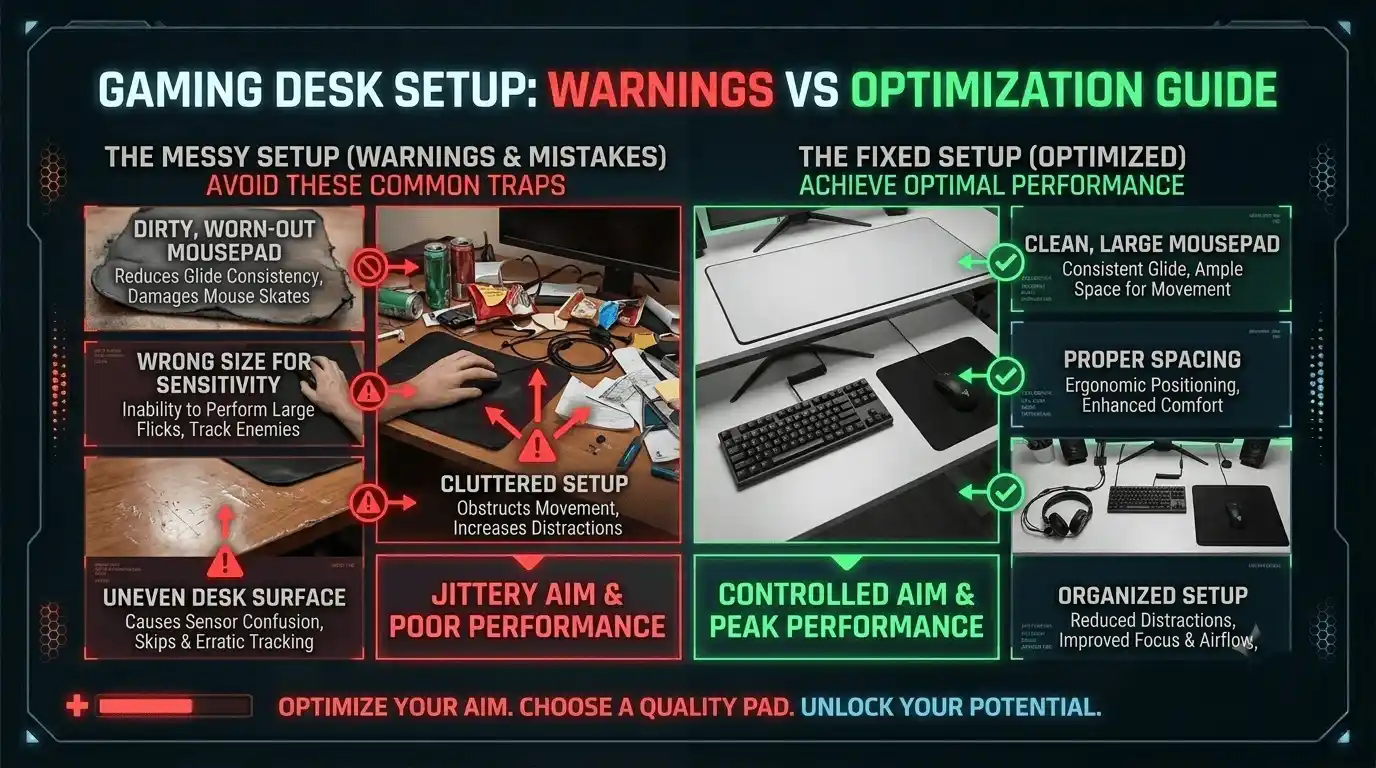
Using a worn-out or dirty surface — how degraded pads destroy tracking consistency
Over time:
- Dirt increases friction
- Oils reduce glide consistency
- Frayed edges disrupt movement
Cleaning or replacing worn pads restores performance.
Wrong mousepad size for your sensitivity and DPI settings
Low-sensitivity FPS players need larger pads for wide arm movements. Small pads restrict movement and force awkward repositioning.
Incorrect mousepad placement and desk-level surface issues
Uneven desks, unstable positioning, and cramped setups all reduce aiming consistency.
Common mistakes include:
- Using tiny pads with low DPI
- Pairing speed pads with precision playstyles
- Ignoring humidity and wear
- Placing pads on unstable surfaces
Calculate Your Exact FPS with the Prime Games Arena FPS Calculator
What the tool does
The Prime Games Arena FPS Calculator estimates your expected in-game frame rate based on your GPU and CPU combination. It helps gamers understand realistic performance before changing settings or upgrading hardware.
Who it is for
The tool is ideal for:
- Low-end PC gamers
- Mid-range gaming setups
- Competitive FPS players
- Anyone targeting 60 FPS, 144 FPS, or higher refresh gaming
Try it now
👉 Try the tool here: Prime Games Arena FPS Calculator
Final Verdict — Does a Mousepad Make a Difference for Gaming?
Summary of what a good mousepad changes and what it honestly does not
A mousepad does not replace:
- A better GPU
- Higher FPS
- CPU upgrades
But it absolutely improves:
- Tracking consistency
- Aim precision
- Flick control
- Competitive reliability
Recommendation by gamer type — casual, competitive, and budget-focused
- Casual gamers → buy an affordable cloth pad
- Competitive FPS players → invest in premium control surfaces
- Low-end PC gamers → optimize peripherals before expensive upgrades
Your next steps — upgrade your mousepad and then verify your full FPS output
A quality mousepad is one of the highest-value upgrades for FPS gaming. It improves aim consistency immediately and costs far less than major hardware upgrades.
Once your setup is optimized, use the FPS Calculator to see whether your GPU and CPU are delivering the frame rates needed for competitive play.