Introduction — Is My PSU Failing?
If your PC suddenly shuts down during gaming, starts stuttering for no reason, or refuses to power on consistently, your power supply unit (PSU) could be the hidden problem. Many users blame the GPU, drivers, RAM, or even Windows first — but unstable power delivery can mimic almost every major hardware failure.
A failing PSU is one of the most dangerous PC issues because it can silently damage other components over time. Unlike a dead graphics card or faulty RAM stick, PSU problems often appear gradually through random crashes, FPS drops, freezes, or power instability.
Why a failing PSU puts your entire PC at risk
- Unstable power delivery can damage your GPU, CPU, motherboard, and storage drives
- A dying PSU rarely fails instantly — symptoms usually worsen over time
- Early diagnosis can prevent expensive component failure
- GPU performance issues and FPS drops are common side effects of poor power delivery
Who this guide is for
This guide is ideal for:
- Users experiencing random shutdowns, crashes, or reboot loops
- Gamers seeing sudden FPS drops or GPU throttling
- Builders unsure whether the PSU, GPU, or motherboard is failing
- Anyone asking: “Is my PSU dying or already dead?”
Signs of PSU Failure — The Complete Symptom List ⚡
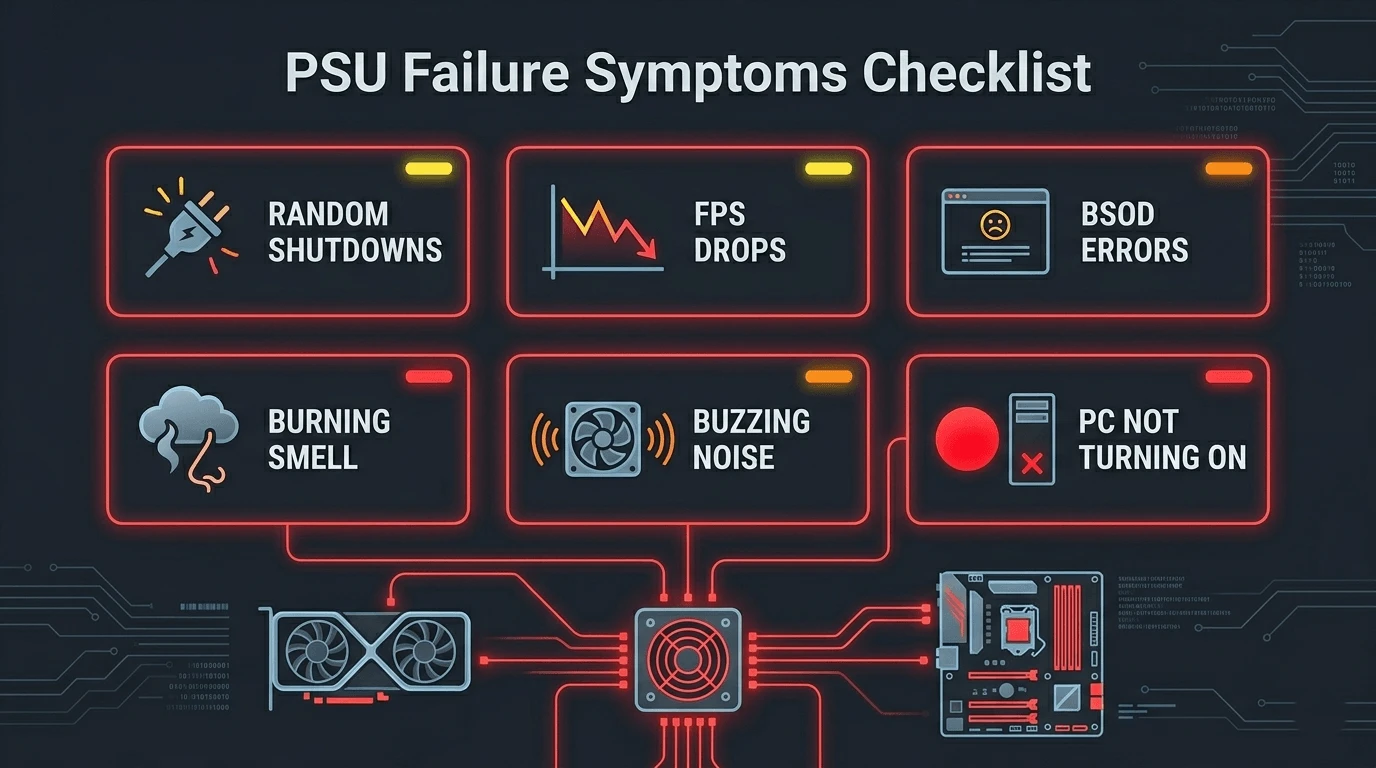
A failing PSU rarely dies immediately. In most cases, the internal capacitors degrade over time, voltage stability worsens, and the symptoms slowly escalate.
Warning signs your power supply is failing
| Symptom | Likely PSU Cause | Severity |
| PC won’t turn on | Dead PSU or blown fuse | Critical |
| Random shutdowns under load | Wattage insufficient / OCP tripping | High |
| System reboots without warning | 12V rail instability | High |
| Blue screen of death (BSOD) | Unstable voltage to CPU/GPU | High |
| PC powers on then immediately off | Short circuit protection triggered | High |
| Sudden FPS drops during gaming | GPU power starvation | Medium |
| Coil whine or buzzing noise | Failing capacitors / ripple | Medium |
| Burning smell from PC | Overheating internals / arcing | Critical |
| Peripheral devices losing power | 5V/3.3V rail failure | Medium |
| Capacitor bulge visible on PSU | Physical component failure | Critical |
Signs of a bad PSU vs other hardware failure
PSU issues are commonly mistaken for GPU crashes, RAM instability, or motherboard defects. The difference is that PSU problems usually affect multiple components at once.
Common PSU-specific indicators include:
- Crashes become worse during gaming or stress testing
- FPS suddenly tanks under GPU-heavy scenes
- Random reboots happen under load, not at idle
- Peripheral devices disconnect unexpectedly
- GPU-Z may show “Power” under Perf Cap Reason
Meanwhile:
- GPU failures often cause artifacting and visual corruption
- RAM issues trigger repeatable memory-related crashes
- Motherboard failures often prevent POST entirely
Dead PSU symptoms vs dying PSU symptoms
| Condition | Symptoms |
| Completely dead PSU | No power, no fans, no LEDs, no POST |
| Dying PSU | Random shutdowns, instability under load |
| Underpowered PSU | Works at idle but crashes during gaming |
PSU Failure Symptoms Breakdown by Category ⚡
Power symptoms
- PC does not turn on at all
- System powers on briefly then shuts off
- Power button becomes unresponsive
- PC only boots after multiple attempts
Performance symptoms — how a bad PSU kills your FPS
A weak or unstable PSU can directly reduce gaming performance.
Common symptoms include:
- Sudden FPS drops during GPU-intensive scenes
- Stuttering and inconsistent frame pacing
- GPU clocks fluctuating aggressively
- GPU underclocking to stay within power limits
These issues are frequently mistaken for thermal throttling or bad GPU drivers.
Stability symptoms
- Random BSODs
- Kernel-Power Event ID 41 errors
- Freezes requiring hard resets
- Failed POST with no clear explanation
Visual and audio symptoms
- Burning smell near PSU exhaust
- Loud coil whine under load
- Clicking or popping noises at startup
- Swollen capacitors visible through PSU vents
Symptom severity classification table
| Severity | Symptoms | Action Required |
| Low | Minor coil whine, occasional FPS dips | Monitor |
| Medium | Shutdowns, BSODs, instability | Test PSU |
| High | Frequent crashes under load | Replace soon |
| Critical | Burning smell, sparks, dead PSU | Replace immediately |
What Causes a PSU to Fail?
Age and capacitor degradation
Most quality PSUs last around 5–10 years, depending on usage and operating temperatures. Over time, electrolytic capacitors dry out and voltage ripple increases.
Budget PSUs typically fail much faster due to lower-quality internal components.
Overloading and insufficient wattage
Running a PSU near maximum capacity constantly accelerates wear.
Common causes include:
- Upgrading the GPU without upgrading the PSU
- Using high-end GPUs on low-wattage units
- Poor-quality power supplies unable to sustain advertised wattage
A safe rule is:
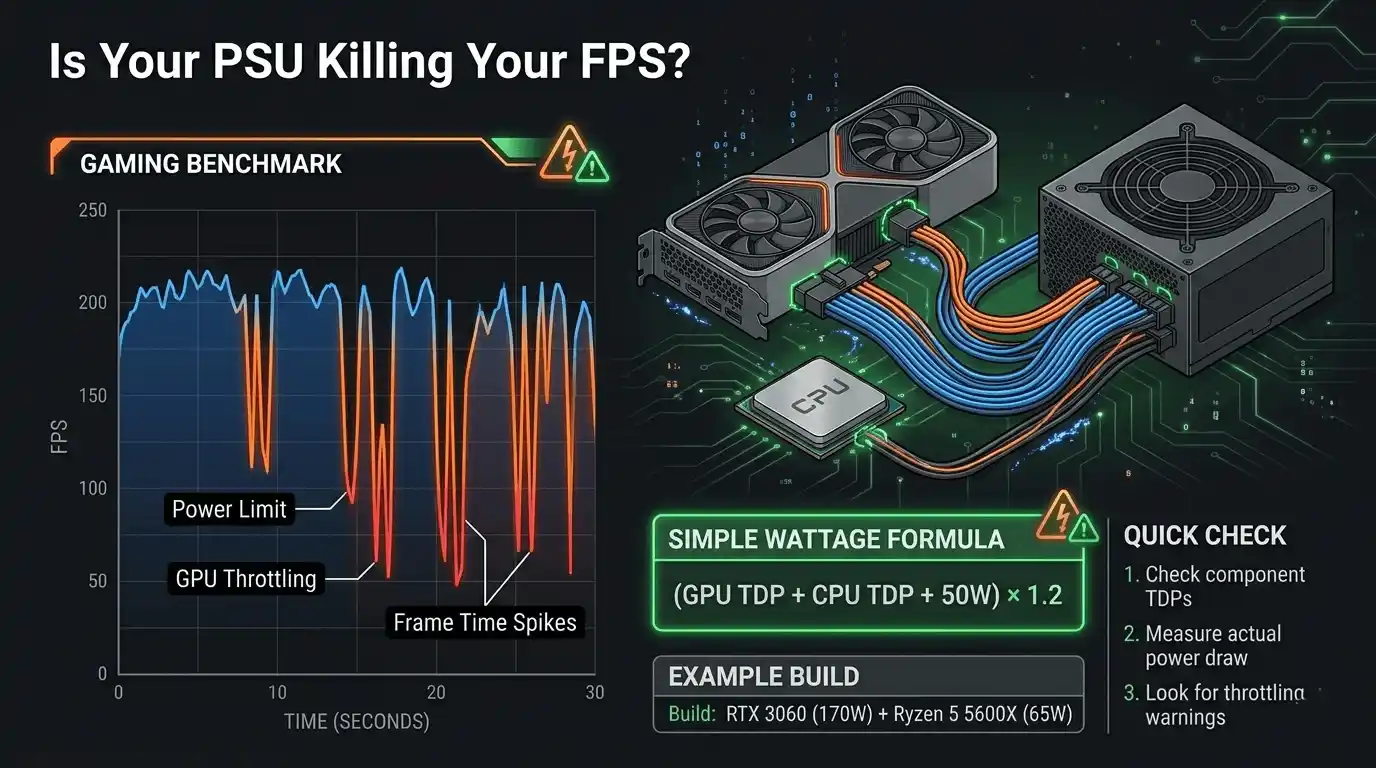
(GPU TDP + CPU TDP + 50W) × 1.2
That gives your minimum recommended PSU wattage.
Power surges and dirty power
Voltage spikes from unstable wall power can damage PSU filtering components. Using a surge protector or UPS significantly reduces risk.
Heat, dust, and airflow problems
Dust-clogged PSU fans and poor airflow increase internal temperatures dramatically, shortening lifespan and increasing instability.
What causes a graphics card to fail due to PSU issues
A failing PSU can damage a GPU by delivering unstable voltage.
Possible symptoms include:
- Permanent artifacting
- VRAM corruption
- Driver instability
- GPU crashes under load
- Black screens during gameplay
How to Test If Your PSU Is Bad ⚡
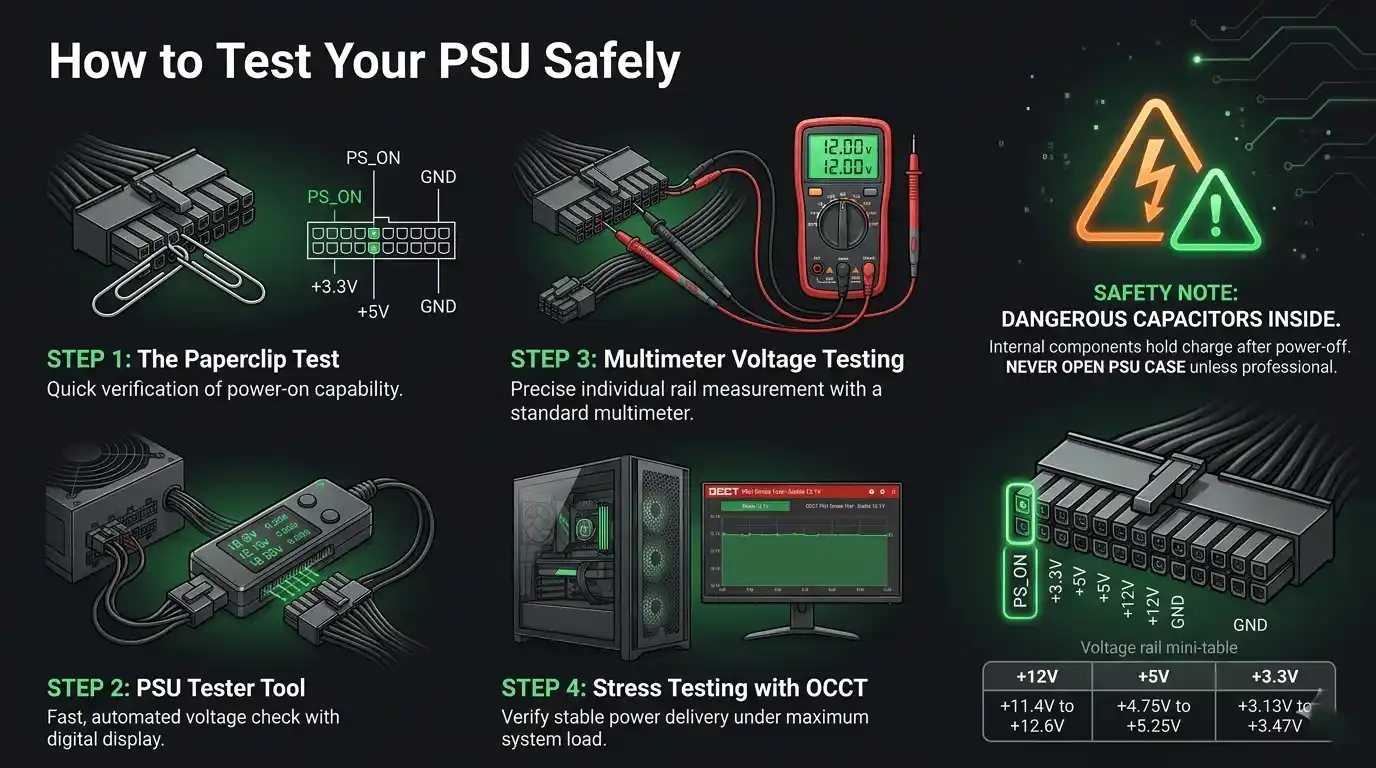
How to test a PSU with a multimeter
A digital multimeter is the most reliable PSU testing method.
ATX voltage tolerance table
| Rail | Nominal Voltage | Acceptable Range | Fail Threshold |
| +12V | 12.0V | 11.4V–12.6V | Outside range |
| +5V | 5.0V | 4.75V–5.25V | Outside ±5% |
| +3.3V | 3.3V | 3.135V–3.465V | Outside ±5% |
| -12V | -12.0V | -10.8V–-13.2V | Outside ±10% |
| +5VSB | 5.0V | 4.75V–5.25V | Outside ±5% |
If readings exceed these tolerances, the PSU is faulty.
How to use a PSU tester tool
A PSU tester quickly checks voltage rails without a motherboard connected.
Advantages:
- Fast and beginner-friendly
- Checks multiple rails simultaneously
- Useful for bench testing
Limitation:
- Most testers do not simulate gaming load
A PSU can pass idle testing but still fail during gaming.
The paperclip test (ATX jump-start method)
This test confirms whether the PSU can power on.
Steps
- Disconnect PSU from all hardware
- Find the 24-pin connector
- Bridge the green PS_ON pin with any black ground pin
- Plug PSU into wall power
- Turn PSU switch on
If the PSU fan never spins, the unit is likely dead.
⚠️ Never open a PSU housing directly. Capacitors can retain lethal charge even when unplugged.
How to monitor PSU health in Windows 10
Useful tools include:
- HWiNFO64 for voltage monitoring
- GPU-Z for Perf Cap power warnings
- OCCT PSU stress testing
- Windows Event Viewer for Kernel-Power errors
Is Your PSU Causing Low FPS and Performance Issues? 👉
If you’re unsure whether your hardware is performing correctly, our What FPS Can I Get on My PC? — How to Check, Estimate & Boost Your Frame Rate guide helps estimate expected gaming performance and identify possible bottlenecks.
How an underpowered or failing PSU kills your frame rate
Modern GPUs require stable 12V power delivery to maintain boost clocks. If the PSU cannot supply enough clean power, the GPU reduces clocks automatically.
That results in:
- Lower FPS
- Severe frame time spikes
- Stuttering during heavy scenes
- GPU throttling under load
Many gamers mistakenly blame drivers or thermals when PSU instability is the real issue.
How to calculate if your PSU has enough wattage for your GPU and CPU
Example:
- RTX 3060 → 170W
- Ryzen 5 5600X → 65W
- Other components → 50W
Total:
(170 + 65 + 50) × 1.2 = 342W minimum
Realistically, a quality 550W PSU is recommended.
Instead of manually estimating expected gaming performance, you can use the FPS Calculator for Low-End PC to compare your GPU and CPU combination against expected FPS output. If your actual FPS is significantly lower than expected, your PSU may be limiting GPU performance through unstable power delivery.
How to Diagnose Power Supply Issues — Full Troubleshooting Guide ⚡
Step 1 — Identify your symptom category
- Power issues → run paperclip or multimeter test
- FPS drops → check GPU power limits
- BSODs → inspect Event Viewer logs
- Burning smells → stop using the PC immediately
Step 2 — Rule out other hardware first
- Test RAM sticks individually
- Use integrated graphics if possible
- Try another known-good PSU
- Remove unnecessary peripherals
If symptoms disappear with another PSU installed, your original PSU is confirmed faulty.
Step 3 — Run a physical PSU test
Use:
- PSU tester
- Multimeter
- OCCT stress test
- FurMark + Prime95 combined load testing
Step 4 — Check wattage sufficiency
Even a fully functional PSU can fail if system demand exceeds safe capacity.
PSU troubleshooting decision table
| Symptom | Most Likely Cause | Test | Fix |
| No power | Dead PSU | Paperclip test | Replace PSU |
| Shutdowns under load | OCP tripping | OCCT stress test | Upgrade PSU |
| Random reboots | 12V instability | Multimeter | Replace PSU |
| FPS drops | GPU power starvation | GPU-Z | Upgrade PSU |
| Burning smell | Internal failure | Visual inspection | Replace immediately |
How to Tell If PSU or GPU Is Failing
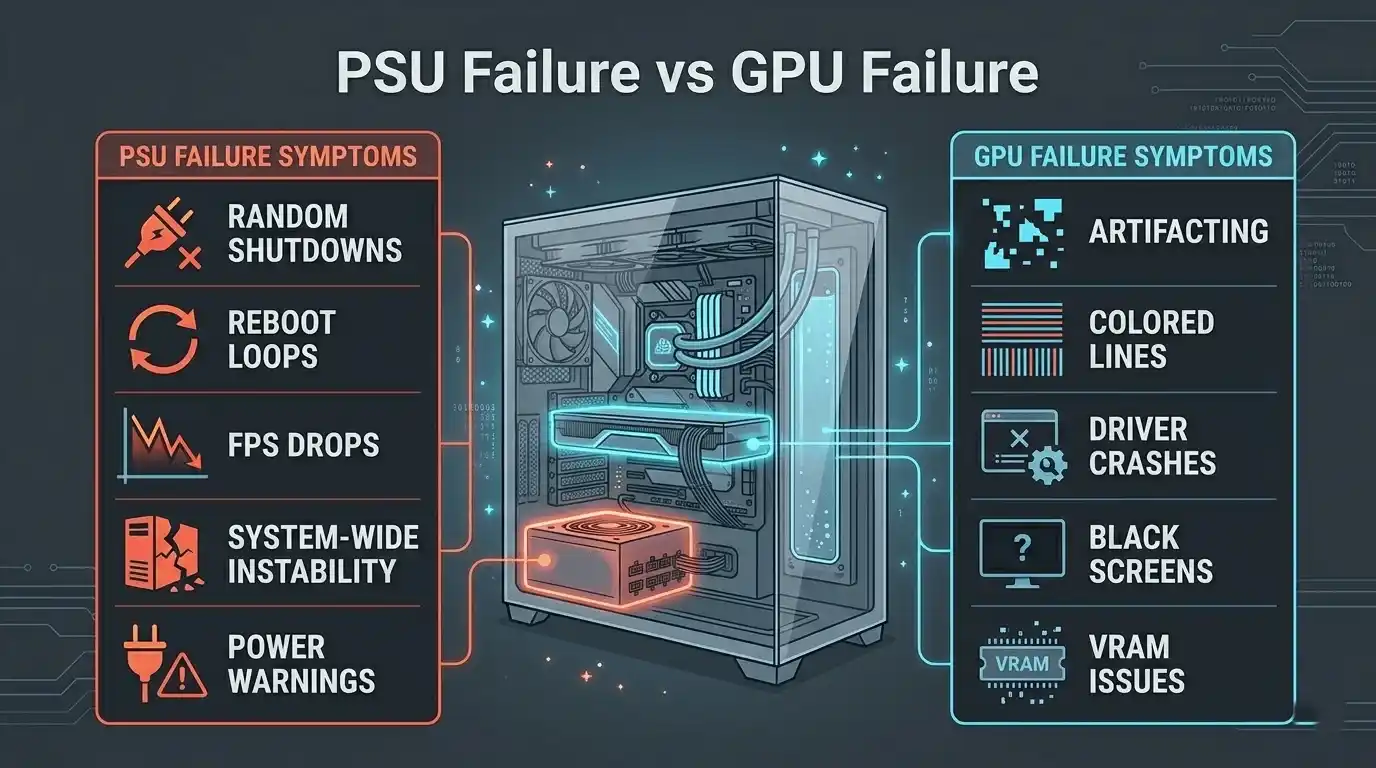
PSU failure vs GPU failure — key differences
| Symptom | PSU Failure | GPU Failure |
| Crashes under load | Common | Common |
| Artifacting | Rare | Very common |
| System-wide instability | Yes | Usually no |
| Fixed by another PSU | Yes | No |
| GPU-Z power warnings | Common | Rare |
How to isolate PSU vs GPU as the cause
- Swap in another PSU
- Test GPU in another PC
- Undervolt the GPU
- Monitor Perf Cap Reason in GPU-Z
Signs your graphics card is failing independently
- Colored lines or artifacting at desktop
- Driver crashes
- VRAM errors
- Black screen recovery loops
If these persist with another PSU, the GPU is likely defective.
Common PC Power Supply Problems and Solutions
PC won’t turn on at all
- Check wall socket and cables
- Verify rear PSU switch position
- Run paperclip test
PC powers on but shuts off under load
This usually means:
- OCP protection triggering
- Insufficient wattage
- PSU overheating
PC randomly reboots or freezes
Aging capacitors often cause voltage ripple that destabilizes the entire system.
PSU making noise — coil whine, clicking, or buzzing
- Mild coil whine can be normal
- Loud buzzing under load is not
- Grinding noise usually indicates fan failure
How to fix a failing PSU
In almost all situations, replacement is safer than repair.
Reliable PSU series include:
- Corsair CX
- Seasonic Focus
- EVGA B-series
Always choose at least an 80 Plus Bronze-rated model from a reputable manufacturer.
Do You Have Enough PSU Wattage? — Check Before It Fails
PSU wattage recommendation table by GPU tier
| GPU | CPU Example | Total Draw | Recommended PSU |
| GTX 1650 | Ryzen 5 3600 | ~180W | 450W |
| RTX 3060 | Ryzen 5 5600X | ~290W | 550W |
| RTX 3070 | i7-12700K | ~380W | 650W |
| RTX 3080 | i9-12900K | ~450W | 750W |
| RTX 4090 | i9-13900K | ~600W | 850W–1000W |
How to know if your PSU is not enough for your GPU
- GPU-Z shows “Power” Perf Cap
- GPU clocks fluctuate heavily
- FPS collapses during demanding scenes
- System crashes only during gaming
Calculate Your Exact FPS with FPS Calculator for Low-End PC
After replacing or testing your PSU, the next step is verifying whether your GPU is finally performing correctly. The FPS Calculator for Low-End PC helps estimate expected gaming performance based on your exact CPU and GPU combination.
This is especially useful if you experienced PSU-related throttling, stuttering, or unstable frame rates before replacing the power supply. By comparing expected FPS with real-world performance, you can quickly identify whether another bottleneck still exists.
The tool is ideal for gamers troubleshooting low FPS, unstable GPU clocks, or performance drops after hardware upgrades.
👉 Try the FPS Calculator for Low-End PC here: FPS Calculator Tool
Conclusion — How to Know If Your PSU Is Failing
Quick-reference symptom checklist
- Random shutdowns or reboots → suspect PSU
- PC won’t turn on → run paperclip test
- FPS drops during gaming → check GPU power limits
- Kernel-Power Event ID 41 → major PSU warning sign
- Burning smell or capacitor damage → replace immediately
- Problems disappear with another PSU → PSU confirmed faulty
When to replace vs when to keep testing
Replace immediately if:
- Burning smell exists
- Physical damage is visible
- PSU is completely dead
- Repeated crashes continue under load
Continue testing if:
- Only minor coil whine exists
- One isolated crash occurred
- No voltage irregularities are detected
Final verdict
A failing PSU is one of the most commonly misdiagnosed PC problems because it affects power delivery, system stability, and gaming performance simultaneously.
Methodical testing is critical:
- Paperclip test
- Multimeter verification
- Wattage calculation
- Swap testing with another PSU
Once the PSU issue is resolved, verify your real gaming performance using the FPS Calculator for Low-End PC to ensure your GPU is finally receiving the stable power it needs for full FPS performance.