Dual monitor setups have become incredibly popular among gamers. Whether you’re keeping Discord open, watching a stream, monitoring system performance, or multitasking while gaming, a second display can boost productivity and convenience. For more gaming optimization tips, FPS guides, hardware advice, and performance troubleshooting, explore our Ultimate Gaming Guide Hub, where we cover everything from frame rates to PC upgrades and gaming settings.
But many gamers ask the same question: does dual monitor setup affect gaming FPS?
The short answer is yes. Running two monitors can reduce gaming FPS, but the amount depends on your GPU, CPU, RAM, monitor resolutions, refresh rates, and what’s running on the second screen.
In this guide, you’ll learn:
- Whether having two monitors affects FPS
- How dual monitors impact GPU, CPU, and RAM usage
- Real-world FPS benchmarks
- Whether low-end PCs suffer more
- How to reduce FPS loss
- When disabling a second monitor makes sense
If you’re planning to add a second display or you’re already experiencing FPS drops, this guide will help you understand exactly what’s happening.
Does a Dual Monitor Setup Actually Affect Gaming FPS?
The Short Answer
Yes, a dual monitor setup affects gaming FPS.
A second monitor requires your graphics card to manage and render an additional display output. Even if the second screen isn’t actively displaying demanding content, it still consumes GPU resources, VRAM, and display bandwidth.
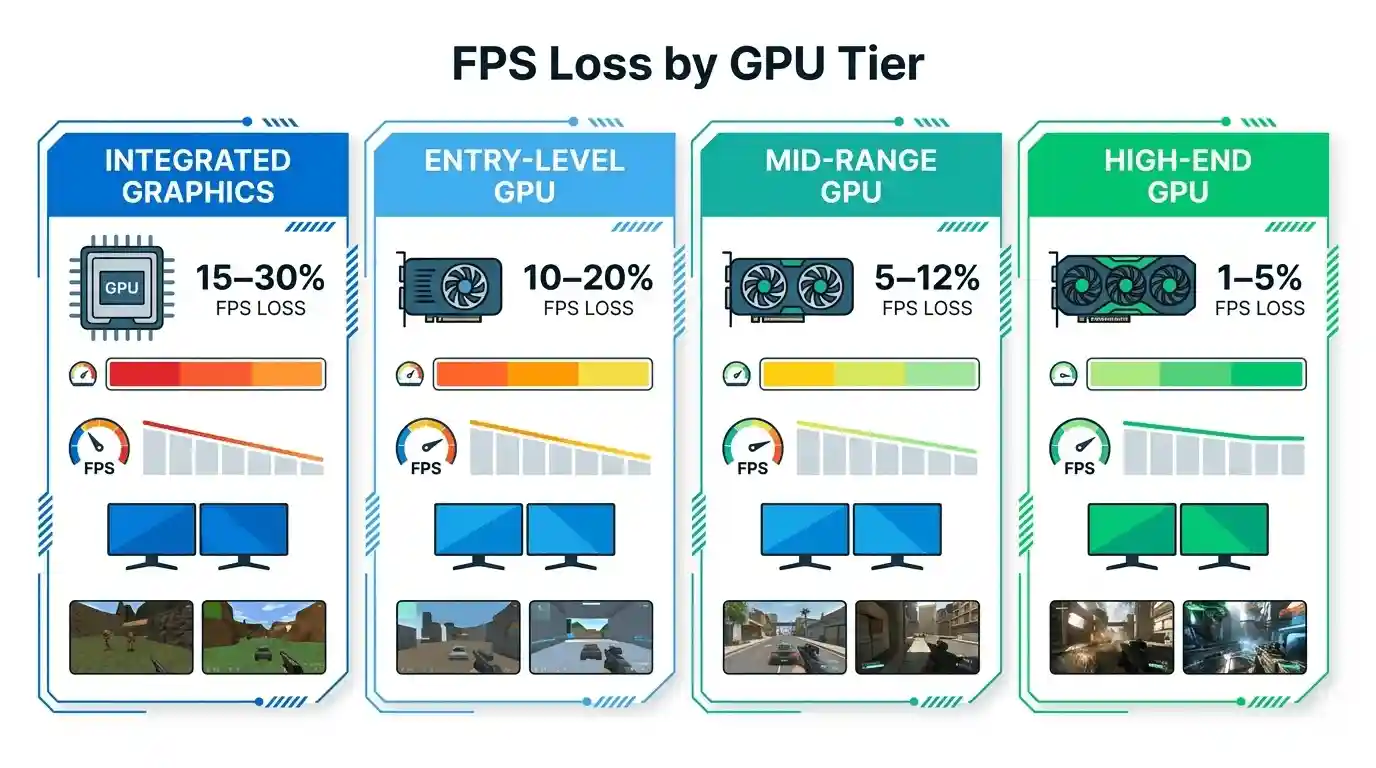
Typical FPS impact by GPU tier:
- High-End GPUs (RTX 4070+, RX 7800 XT+): 1–5% FPS loss
- Mid-Range GPUs (RTX 3060, RX 6600 XT): 5–12% FPS loss
- Entry-Level GPUs (GTX 1650, RX 6500 XT): 10–20% FPS loss
- Integrated Graphics: 15–30%+ FPS loss
The lower your hardware tier, the more noticeable the performance impact becomes.
Why Your GPU Cares About a Second Monitor
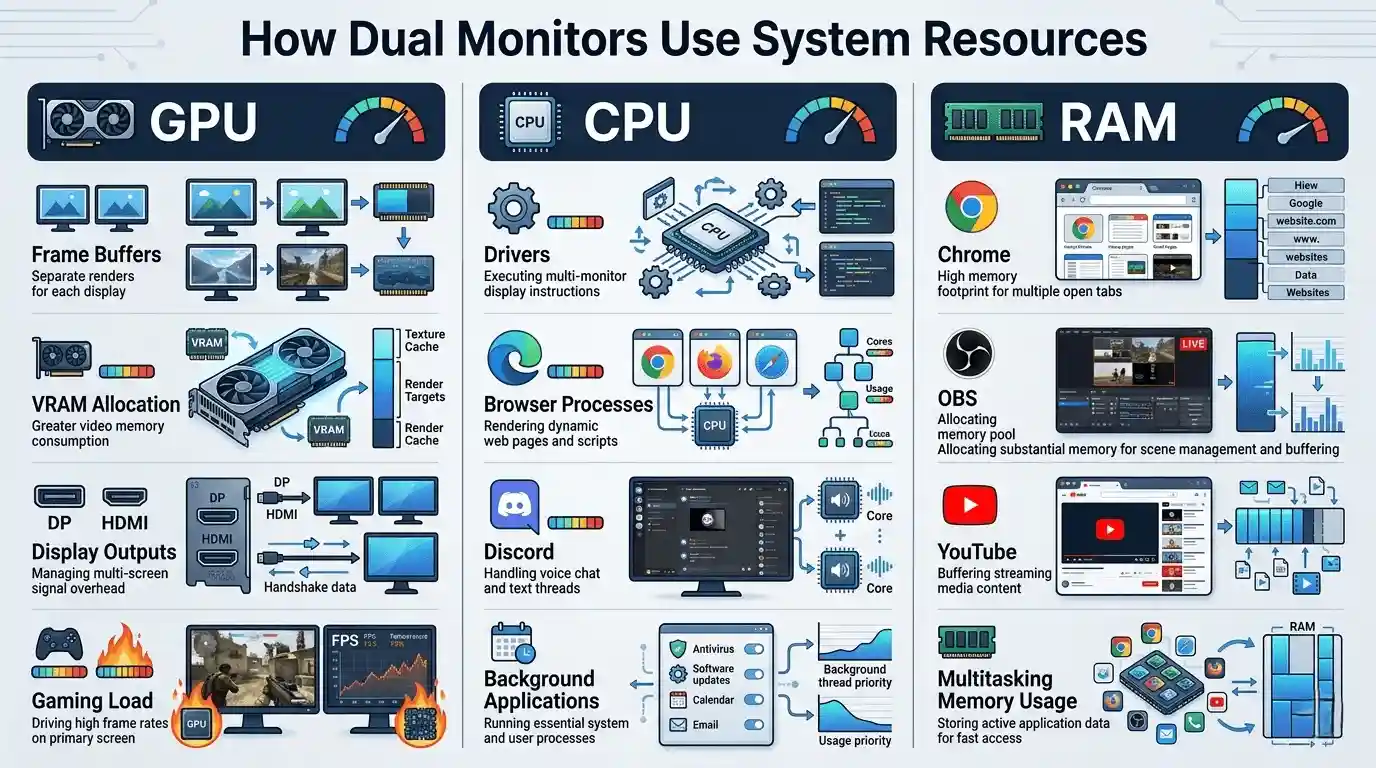
Every active monitor requires resources from the GPU. Modern graphics cards use dedicated video memory and display controllers to manage multiple outputs simultaneously, a core function of the graphics processing unit (GPU).
When a second display is connected, your graphics card must:
- Maintain a separate frame buffer
- Allocate VRAM for each display
- Process multiple display outputs
- Handle refresh cycles for both monitors
The impact increases when the second monitor is running:
- YouTube videos
- Twitch streams
- Discord video calls
- OBS streaming software
- Browser tabs with hardware acceleration
A secondary 144Hz monitor can also consume more resources than a standard 60Hz display.
How Does a Dual Monitor Setup Affect GPU, CPU, and RAM?
Understanding which components matter most can help prioritize upgrades, and our PC Parts That Affect Gaming Performance Guide explains the role of the GPU, CPU, RAM, and storage in overall FPS.
Does Having 2 Monitors Affect GPU Performance?
The GPU experiences the largest performance impact in a dual-monitor setup.
It must simultaneously handle:
- Game rendering
- Desktop rendering
- Video playback
- Multiple display outputs
| GPU Tier | Example GPUs | Idle Monitor 2 FPS Impact | Active Monitor 2 FPS Impact |
| Integrated / Low-End | Intel UHD, GT 1030, RX 550 | 10–20% drop | 20–35%+ drop |
| Entry Mid-Range | GTX 1650, RX 6500 XT | 5–10% drop | 10–20% drop |
| Mid-Range | RTX 3060, RX 6600 XT | 2–6% drop | 5–12% drop |
| High-End | RTX 4070, RX 7800 XT+ | Less than 2% | 3–7% drop |
If your GPU already runs near 100% utilization during gaming, a second monitor can push it over the edge.
Does Having 2 Monitors Affect CPU Performance?
The CPU isn’t responsible for rendering displays, but it still plays a role.
Additional CPU overhead comes from:
- Display drivers
- Window management
- Background applications
- Streaming software
- Web browsers
This becomes especially important in CPU-bound games such as:
- Counter-Strike 2
- Valorant
- Apex Legends
- Rainbow Six Siege
In these titles, background processes on Monitor 2 can noticeably reduce FPS.
Does Having Multiple Monitors Affect RAM?
The displays themselves use very little system memory.
The bigger issue is multitasking.
Common RAM-consuming applications include:
- Chrome
- Discord
- OBS Studio
- Spotify
- YouTube
Systems with only 8GB RAM are more likely to experience stuttering and paging when using multiple monitors.
For modern gaming, 16GB RAM is generally considered the minimum comfortable amount for dual-monitor use.
How Much FPS Do You Lose with Dual Monitors? (Benchmark Data)
If you’d like to estimate performance using your own hardware, check out our guide on What FPS Can I Get on My PC?, which explains how to predict frame rates based on your CPU and GPU.
FPS Impact: Single Monitor vs Dual Monitor Setup
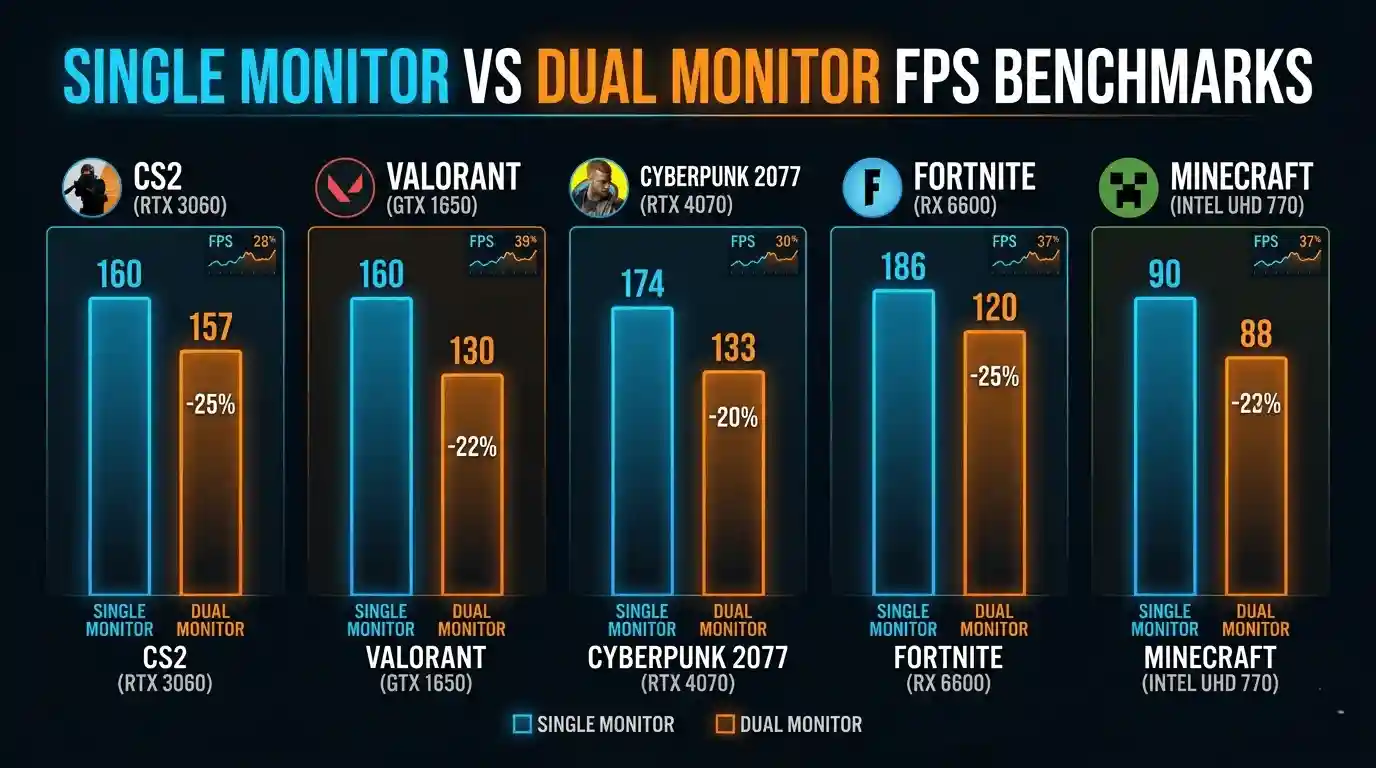
The following benchmarks assume a secondary monitor running an idle 1080p desktop.
| Game | Resolution | GPU | Single Monitor FPS | Dual Monitor FPS | FPS Drop | % Loss |
| CS2 / Valorant | 1080p | GTX 1650 | 144 FPS | 128 FPS | -16 FPS | ~11% |
| CS2 / Valorant | 1080p | RTX 3060 | 300 FPS | 285 FPS | -15 FPS | ~5% |
| Cyberpunk 2077 | 1080p Ultra | RTX 3070 | 78 FPS | 72 FPS | -6 FPS | ~8% |
| Cyberpunk 2077 | 1080p Ultra | RTX 4070 | 110 FPS | 107 FPS | -3 FPS | ~3% |
| Fortnite | 1080p High | RX 6600 | 120 FPS | 108 FPS | -12 FPS | ~10% |
| Minecraft | 1080p | Intel UHD 770 | 60 FPS | 40 FPS | -20 FPS | ~33% |
These numbers are realistic estimates and should be viewed as directional benchmarks rather than guarantees.
Does Running Two Monitors Lower FPS More in CPU-Bottlenecked Games?
Yes.
Games that rely heavily on CPU performance tend to lose more FPS when background applications are active on a second monitor.
Examples include:
- Counter-Strike 2
- Valorant
- Apex Legends
- League of Legends
GPU-heavy games like Cyberpunk 2077 or Red Dead Redemption 2 generally experience smaller FPS reductions because the primary bottleneck remains the graphics card.
Does Having 3 Monitors Affect FPS Even More?
Absolutely.
Every additional display increases:
- VRAM allocation
- Display bandwidth requirements
- GPU overhead
Expect an additional 3–8% FPS reduction per monitor on most mid-range GPUs.
Triple-monitor gaming, where all three displays are rendering the game, is significantly more demanding and typically requires hardware such as an RTX 4080, RTX 5080, RX 7900 XT, or better.
Does It Matter What’s Running on Your Second Monitor?
Active vs Idle Second Screen — Real FPS Difference
The biggest factor isn’t simply having a second monitor connected.
It’s what you’re doing on it.
| Activity on Monitor 2 | Estimated FPS Impact | GPU Load Increase | CPU Load Increase |
| Turned Off / Disabled | 0% | None | None |
| Idle Desktop | 1–3% | Very Low | Very Low |
| Static Browser Tab | 2–5% | Low | Low |
| YouTube 1080p | 5–10% | Moderate | Moderate |
| YouTube 4K | 8–15% | High | High |
| Discord Video Call | 5–12% | Moderate | Moderate-High |
| OBS Streaming | 10–25% | High | Very High |
| Gaming on Monitor 2 | 20–40%+ | Very High | Very High |
Will Turning Off My Second Monitor Increase FPS?
Yes.
Disabling your second monitor is one of the quickest ways to regain lost performance.
Expected gains:
- Low-end GPU: 15–30 FPS
- Mid-range GPU: 5–15 FPS
- High-end GPU: 2–5 FPS
For competitive gaming, many esports players disable secondary displays before launching their games.
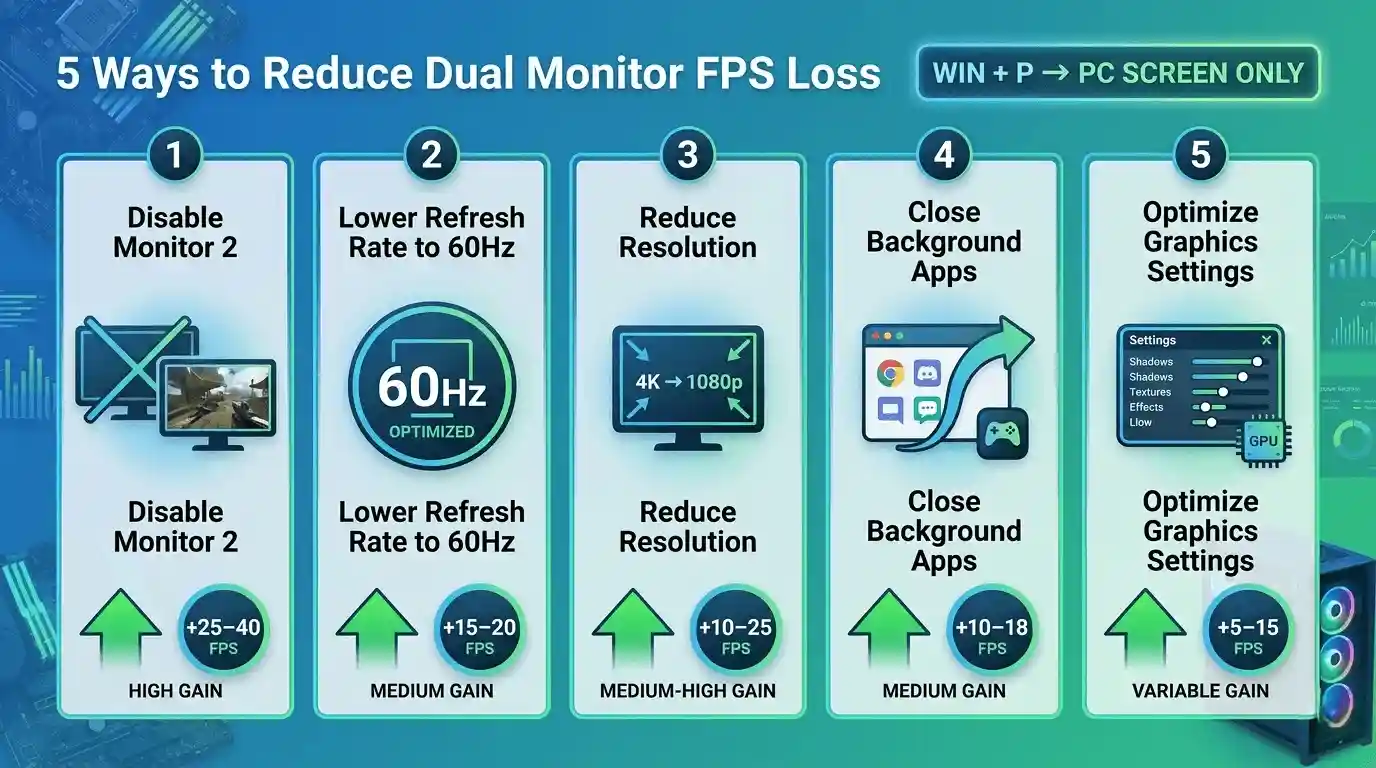
Windows shortcut:
Win + P → PC Screen Only
What FPS Will Your GPU Actually Deliver in Your Favourite Games?
Knowing whether dual monitors affect FPS is useful, but knowing your expected frame rate is even more valuable.
Instead of manually estimating performance, you can use the FPS Calculator for Low-End PC. It calculates expected FPS based on your exact GPU and CPU combination, helping you predict performance before launching a game.
👉 FPS Calculator for Low-End PC: https://primegamesarena.com/fps-calculator-for-low-end-pc/
How to Minimize FPS Loss on a Dual Monitor Gaming Setup
You can further improve performance by following our Windows 11 Gaming Optimization Guide, which covers additional settings that help maximize FPS.
Best Windows Settings to Reduce Dual Monitor FPS Impact
To reduce FPS loss:
- Disable Monitor 2 before gaming
- Lower the second monitor refresh rate to 60Hz
- Reduce Monitor 2 resolution
- Avoid video playback during gaming
- Close unnecessary applications
These adjustments can recover valuable GPU resources.
GPU Driver Settings for Dual Monitor Gaming (NVIDIA & AMD)
| Setting | Platform | Recommendation |
| Power Management Mode | NVIDIA | Prefer Maximum Performance |
| Texture Filtering | NVIDIA / AMD | Performance |
| Vertical Sync | NVIDIA / AMD | Off |
| G-Sync / FreeSync | NVIDIA / AMD | Enable on gaming monitor only |
| Refresh Rate Override | Both | Set Monitor 2 to 60Hz |
In-Game Settings That Help Offset Dual Monitor FPS Loss
| In-Game Setting | Recommended Adjustment | FPS Impact |
| Resolution Scale | 90–95% | +5–12 FPS |
| Anti-Aliasing | FXAA or Off | +5–10 FPS |
| Shadow Quality | Medium | +5–15 FPS |
| Ambient Occlusion | Off | +3–8 FPS |
| V-Sync | Off | Variable |
| Background Apps | Close Them | +5–20 FPS |
Should Both Monitors Run at the Same Resolution?
Ideally, yes.
Mismatched resolutions create additional rendering overhead.
For example:
- Primary Monitor: 1080p
- Secondary Monitor: 4K
This forces the GPU to manage vastly different display workloads simultaneously.
For best performance, keep Monitor 2 at the same resolution or lower than your gaming display.
Dual Monitor Setup Issues and FPS Fixes
Common FPS Problems on Dual Monitor Setups — Causes and Fixes
| Problem | Cause | Fix |
| FPS drops when Monitor 2 is active | GPU overhead | Disable Monitor 2 |
| Screen tearing | VRR configuration | Enable G-Sync/FreeSync only on Monitor 1 |
| Alt-tab stuttering | Window management overhead | Use exclusive fullscreen |
| GPU overheating | Higher utilization | Lower refresh rate on Monitor 2 |
| Frame-time spikes | Background apps | Close unnecessary programs |
| Low FPS in esports games | CPU contention | Limit background processes |
Does Dual Monitor Affect FPS on Low-End PCs More?
Yes.
Low-end hardware experiences the largest performance penalties.
- Intel UHD Graphics: Severe impact
- GT 1030: Significant FPS loss
- RX 550: Noticeable degradation
- GTX 1650: Moderate impact
- RTX 3060+: Usually minor impact
If you’re using integrated graphics, disabling the second monitor before gaming is strongly recommended. Before upgrading your setup, it’s worth learning How Much FPS Your PC Can Handle so you can identify whether your current hardware is already near its performance limits.
Calculate Your Exact FPS with FPS Calculator for Low-End PC
Generic benchmark charts can only provide rough estimates. Every system behaves differently depending on the CPU, GPU, RAM configuration, game settings, and background applications.
The FPS Calculator for Low-End PC helps gamers estimate expected frame rates using their specific hardware combination. It’s especially useful if you’re trying to determine how much performance headroom you have before adding a second monitor.
Whether you’re running a GTX 1650, RTX 3060, RX 6600, or integrated graphics, the calculator provides a faster way to estimate performance without trial and error.
👉 Try the FPS Calculator for Low-End PC here: https://primegamesarena.com/fps-calculator-for-low-end-pc/
Conclusion — Is Gaming on a Dual Monitor Setup Worth It?
Final Verdict
So, does dual monitor setup affect gaming FPS?
Yes, but the severity depends largely on your hardware.
- Low-end and integrated GPUs can lose 15–30% or more performance.
- Mid-range GPUs typically lose between 5–15%.
- High-end GPUs usually see only a minor reduction when the second display is idle.
For most gamers, a dual-monitor setup remains worth it because of the productivity and convenience benefits. However, if you’re chasing maximum FPS in competitive games, disabling the second monitor before gaming is still the most effective optimization.
If you want a more accurate estimate for your own system, use the FPS Calculator for Low-End PC to predict your expected frame rates and make smarter hardware decisions.
FAQ
Q: Does having multiple monitors affect FPS?
Yes. Additional monitors consume GPU resources and can reduce available performance for gaming. The impact ranges from minimal on high-end GPUs to substantial on entry-level hardware.
Q: Does having two monitors affect FPS in competitive games?
Yes. Competitive games are often CPU-sensitive, and background applications running on the second monitor can lower frame rates.
Q: Do multiple monitors affect performance on low-end PCs?
Yes. Integrated graphics and entry-level GPUs can lose 15–30% FPS when running multiple displays.
Q: Will turning off my second monitor increase FPS?
Yes. Disabling the second display frees GPU resources and often recovers 5–20 FPS depending on hardware.
Q: Does having 2 monitors affect GPU performance specifically?
Yes. The GPU must maintain display outputs and allocate VRAM for every active monitor.
Q: Does having 2 monitors affect CPU performance?
Indirectly. Background applications running on the second display can increase CPU usage and affect gaming performance.
Q: Does having multiple monitors affect RAM?
Moderately. The displays themselves use little RAM, but multitasking applications can significantly increase memory usage.
Q: Does having 3 monitors affect FPS more than dual monitors?
Yes. Each additional display increases GPU overhead and can further reduce frame rates.
Q: Does dual monitor affect FPS Reddit users say?
Most Reddit users report minimal impact on modern high-end GPUs, while GTX 1650-class and integrated graphics users often report noticeable FPS losses. The most common recommendation is disabling the second monitor before gaming if maximum performance is the goal.