Can My PC Run GTA 6? Here’s What You Need to Know
Wondering can my PC run GTA 6 before the game arrives on PC? You’re not alone. One of the biggest concerns for PC gamers is whether their current hardware can handle Rockstar’s next-generation open-world experience without suffering from poor frame rates, stuttering, or long loading times.
If you want more performance-focused gaming breakdowns like this, check out our The Ultimate Gaming Guide Hub, where we cover FPS tips, PC builds, and optimization guides for modern games.
This guide covers everything you need to know about Grand Theft Auto 6 PC requirements, including estimated system requirements, expected FPS performance, GPU and CPU benchmarks, graphics settings recommendations, optimization tips, and realistic upgrade advice.
If your goal is smooth gameplay at 60 FPS or higher, this article will help you understand exactly where your system stands.
GTA 6 PC System Requirements (Official & Estimated)
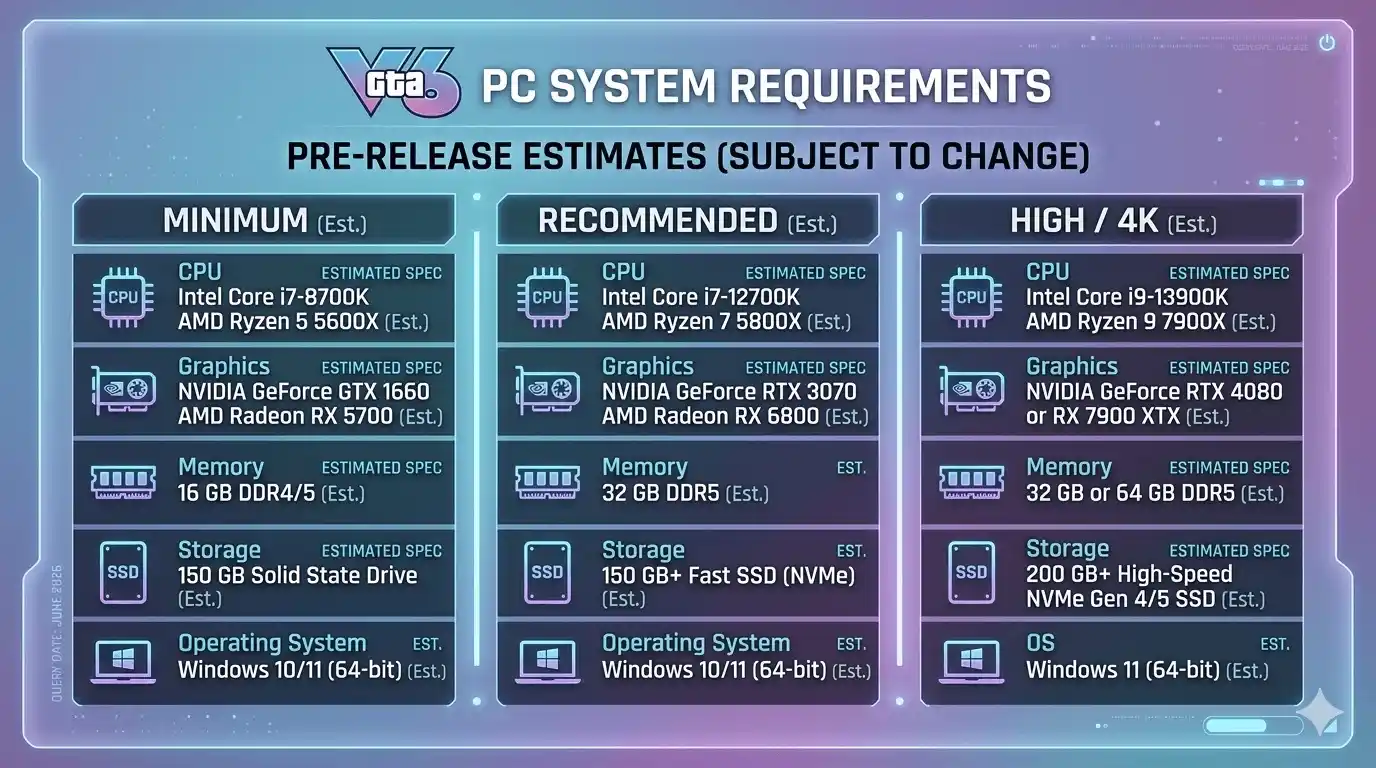
Since Rockstar has not fully detailed every PC specification yet, the following requirements represent the most realistic estimates based on current hardware demands and the game’s technological ambitions.
GTA 6 Minimum System Requirements
| Component | Minimum Spec |
| OS | Windows 10/11 (64-bit) |
| CPU | Intel Core i7-8700K / AMD Ryzen 5 3600X |
| RAM | 16 GB |
| GPU | NVIDIA GTX 1080 / AMD RX 5700 XT |
| VRAM | 8 GB |
| Storage | 150 GB SSD |
| DirectX | DirectX 12 |
These GTA 6 minimum system requirements should deliver playable performance around 30–60 FPS at 1080p using Medium settings.
GTA 6 Recommended System Requirements
| Component | Recommended Spec |
| OS | Windows 11 64-bit |
| CPU | Intel Core i9-10900K / AMD Ryzen 7 5800X3D |
| RAM | 32 GB |
| GPU | NVIDIA RTX 3080 / AMD RX 6800 XT |
| VRAM | 10 GB+ |
| Storage | 150 GB NVMe SSD |
| DirectX | DirectX 12 Ultimate |
Players targeting High or Ultra settings with stable frame rates should consider these GTA 6 recommended system requirements.
GTA 6 High Graphics / 4K Requirements
| Component | High/4K Spec |
| OS | Windows 11 64-bit |
| CPU | Intel Core i9-13900K / AMD Ryzen 9 7900X |
| RAM | 32–64 GB |
| GPU | NVIDIA RTX 4080 / AMD RX 7900 XTX |
| VRAM | 16 GB+ |
| Storage | NVMe Gen 4 SSD |
For native 4K gaming with ray tracing and ultra textures, high-end hardware becomes essential.
GTA 6 PC Requirements vs GTA 5 — How Big Is the Jump?
The difference between GTA 5 system requirements and GTA 6 system requirements is substantial.
Side-by-Side Spec Comparison: GTA 5 vs GTA 6
| Component | GTA 5 Minimum | GTA 6 Minimum | GTA 6 Recommended |
| CPU | Intel Core 2 Quad Q6600 | Core i7-8700K | Core i9-10900K |
| GPU | NVIDIA GTX 660 | GTX 1080 | RTX 3080 |
| RAM | 8 GB | 16 GB | 32 GB |
| Storage | 72 GB HDD | 150 GB SSD | 150 GB NVMe SSD |
| OS | Windows 8.1 | Windows 10/11 | Windows 11 |
Key takeaways:
- GTA 6 requires roughly 2–3x more GPU power than GTA 5.
- SSD storage is effectively mandatory.
- VRAM requirements have doubled compared to GTA 5.
- Modern CPUs are far more important due to larger world simulation demands.
Can Your PC That Ran GTA 5 Handle GTA 6?
Budget PC
- GTX 1060, RX 580, or similar hardware may struggle.
- Expect Low settings and reduced FPS.
Mid-Range PC
- RTX 3060, RTX 3070, RX 6700 XT users should enjoy solid 1080p and 1440p performance.
High-End PC
- RTX 3080 and above are well-positioned for High and Ultra settings.
Simply because your PC could run GTA 5 does not guarantee it can comfortably run GTA 6.
Windows Requirements for GTA 6 on PC
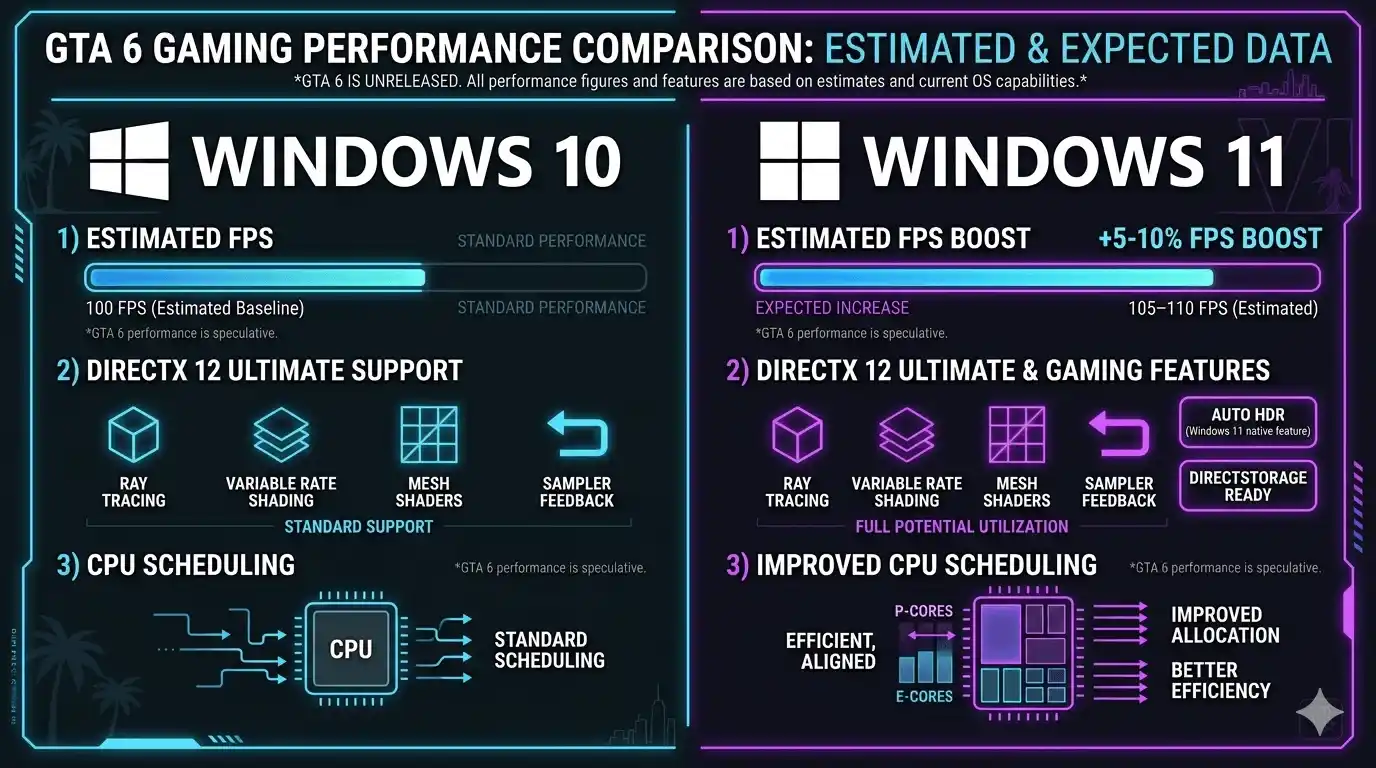
Which Windows Version Do You Need for GTA 6?
For GTA 6 on PC:
- Windows 10 64-bit is the minimum supported operating system.
- Windows 11 is strongly recommended.
- 32-bit Windows versions are incompatible.
- DirectX 12 support is required.
To check your Windows version:
- Press Windows + R
- Type winver
- Press Enter
Windows 11 vs Windows 10 — FPS Impact in GTA 6
| Windows Version | Average FPS Gain | DirectX 12 Ultimate | Recommended? |
| Windows 10 64-bit | Baseline | Partial | Minimum Only |
| Windows 11 64-bit | +5–10% FPS | Full Support | ✅ Yes |
Windows 11 offers better scheduling for modern CPUs and improved gaming technologies, making it the preferred operating system for GTA 6.
What FPS Can You Expect in GTA 6? GPU Benchmark Breakdown
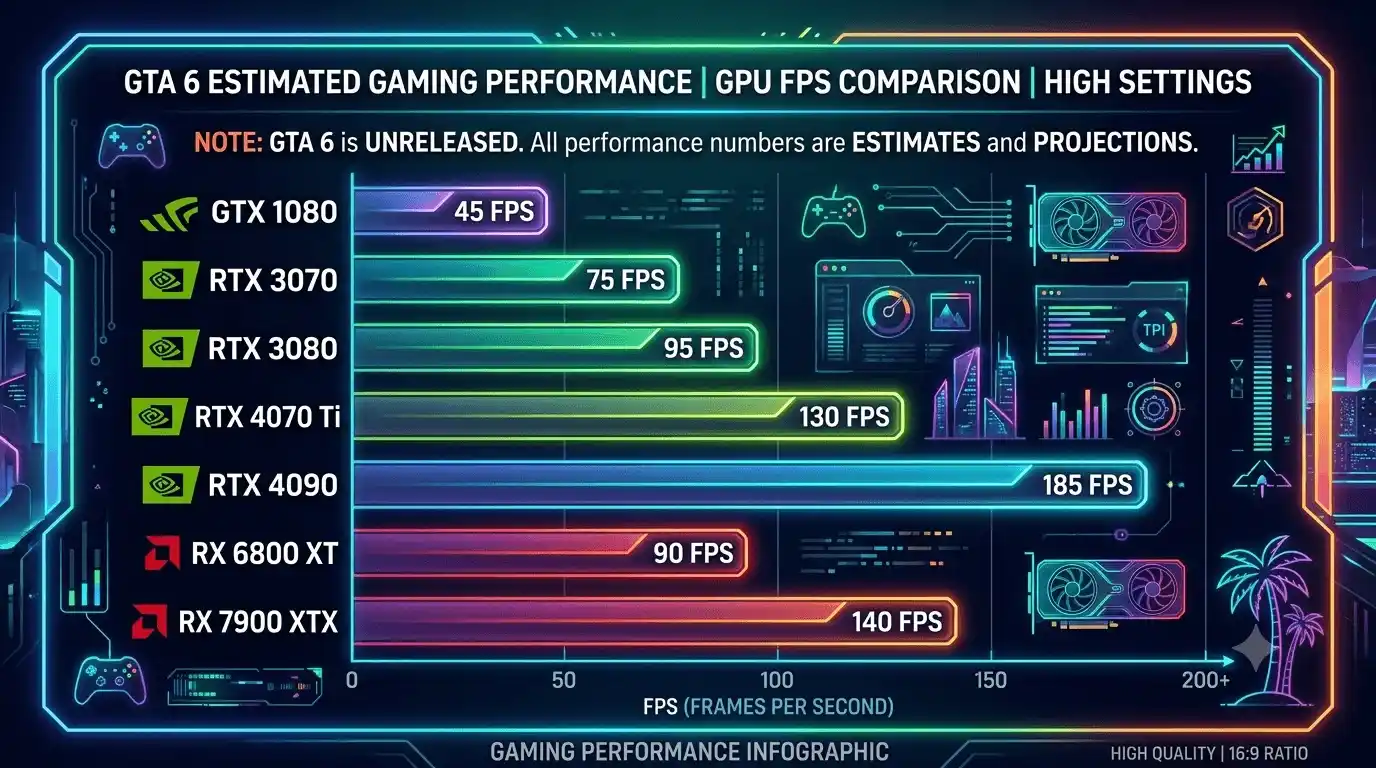
FPS performance depends on your GPU, CPU, resolution, and graphics settings.
If you’re trying to understand how different hardware affects performance across modern games, you may also like our deep dives into Does RAM Affect FPS in Games and What PC Parts Affect Gaming the Most (Complete FPS Performance Guide).
GTA 6 FPS Benchmark Table by GPU (1080p / 1440p / 4K)
| GPU | 1080p (Medium) | 1080p (Ultra) | 1440p (High) | 4K (Ultra) |
| GTX 1080 | ~55–65 FPS | ~35–45 FPS | ~30–40 FPS | Not Viable |
| RTX 3070 | ~85–95 FPS | ~65–75 FPS | ~55–65 FPS | ~30–40 FPS |
| RTX 3080 | ~100–115 FPS | ~80–95 FPS | ~70–80 FPS | ~45–55 FPS |
| RTX 4070 Ti | ~120–130 FPS | ~100–110 FPS | ~85–95 FPS | ~55–65 FPS |
| RTX 4090 | ~155–170 FPS | ~130–145 FPS | ~110–120 FPS | ~80–95 FPS |
| RX 6800 XT | ~95–105 FPS | ~75–85 FPS | ~65–75 FPS | ~40–50 FPS |
| RX 7900 XTX | ~140–155 FPS | ~115–125 FPS | ~95–105 FPS | ~70–80 FPS |
GTA 6 CPU Performance — Does Your Processor Bottleneck?
| CPU | FPS Impact | Bottleneck Risk | Notes |
| Intel Core i7-8700K | Minimum viable | High at Ultra | Upgrade recommended |
| AMD Ryzen 5 3600X | Minimum viable | Medium | Playable at medium settings |
| AMD Ryzen 5 5600X | Good | Low | Strong mid-range pick |
| Intel Core i7-12700K | Excellent | Very Low | No bottleneck at 1080p/1440p |
| AMD Ryzen 7 5800X3D | Excellent | Minimal | Best price-to-FPS CPU |
| Intel Core i9-13900K | Top tier | None | Recommended for 4K builds |
👉 Check Your Exact Expected FPS Before Playing GTA 6
Not sure what FPS your specific GPU and CPU combination will deliver in GTA 6?
Instead of manually estimating, you can use the FPS Calculator for Low-End PC — it calculates your expected FPS based on your exact GPU and CPU specs. This saves time and gives you a more personalized performance estimate before upgrading or launching the game.
GTA 6 FPS at Different Settings — Low vs Medium vs Ultra Comparison
GTA 6 Settings FPS Impact Table (RTX 3080 at 1080p)
| Settings Preset | Avg FPS | Frame Time | GPU Usage | VRAM Usage |
| Low | ~130–145 FPS | ~7ms | ~70% | ~5 GB |
| Medium | ~100–115 FPS | ~9ms | ~82% | ~7 GB |
| High | ~80–90 FPS | ~12ms | ~91% | ~9 GB |
| Ultra | ~65–75 FPS | ~15ms | ~99% | ~10 GB+ |
Which Settings Hurt FPS the Most in GTA 6?
Ranked from highest impact to lowest:
- Ray Tracing (30–40% FPS loss)
- Shadow Quality
- Draw Distance
- Texture Quality
- Ambient Occlusion
- Anti-Aliasing
Players seeking higher frame rates should prioritize lowering these settings first.
Best In-Game Settings for Higher FPS in GTA 6
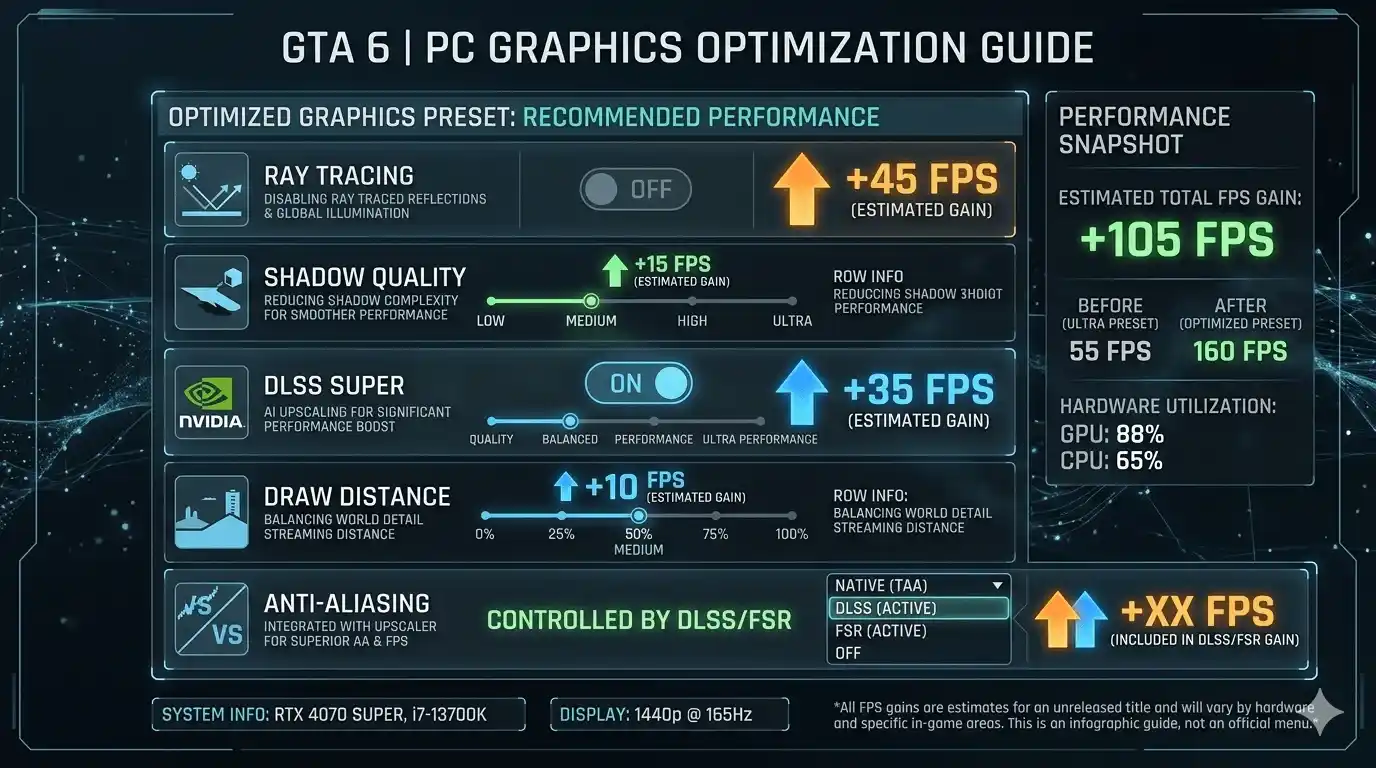
For more system-wide optimization tips, you can also explore Optimize Windows 11 for Gaming FPS Boost Settings (2025) and SSD vs HDD for Gaming: Which Is Better in 2025 to further improve loading times and stability.
Recommended Settings for 60 FPS on a Mid-Range PC
| Setting | Recommended Value | FPS Gain |
| Ray Tracing | Off | +30–40 FPS |
| Shadow Quality | Medium | +8–12 FPS |
| Texture Quality | High (if 8GB VRAM) | Neutral |
| Draw Distance | Medium | +10–15 FPS |
| Anti-Aliasing | DLSS/FSR (Quality) | +15–25 FPS |
| V-Sync | Off | +5–8 FPS |
DLSS, FSR, and XeSS — Which Upscaling Works Best in GTA 6?
DLSS 3
- Best image quality.
- Excellent FPS gains.
- Ideal for RTX 40-series owners.
FSR 3
- Works on AMD and NVIDIA GPUs.
- Strong performance improvements.
- Great for older hardware.
XeSS
- Best for Intel Arc users.
- Competitive visual quality.
Tips to Boost GTA 6 FPS on PC — System-Level Optimizations
Windows & Driver Optimizations for GTA 6
- Update GPU drivers before launch.
- Enable Windows Game Mode.
- Disable Xbox Game Bar.
- Close unnecessary background applications.
- Use High Performance power mode.
- Enable HAGS on Windows 11.
In-Game FPS Tweaks for Low-End and Mid-Range PCs
- Lower resolution scaling before reducing textures.
- Disable ray tracing on weaker GPUs.
- Use DLSS or FSR whenever available.
- Cap FPS at 60 for smoother frame pacing.
- Monitor temperatures to prevent thermal throttling.
Storage & RAM Tips That Affect GTA 6 Loading and FPS Stability
- Install GTA 6 on an NVMe SSD.
- Use at least 16GB RAM.
- Enable dual-channel memory.
- Keep sufficient free storage space available.
Common GTA 6 PC Performance Issues & Fixes
GTA 6 Low FPS Even on Recommended Specs — Causes & Fixes
| Issue | Likely Cause | Fix |
| FPS drops in city areas | CPU bottleneck | Lower draw distance |
| Stuttering on high settings | VRAM overflow | Reduce texture quality |
| Frame time spikes | Driver issue | Reinstall GPU driver |
| Game won’t launch | OS incompatibility | Upgrade to Windows 10/11 64-bit |
GTA 6 Crashing or Not Launching on PC — Quick Fixes
- Verify game files.
- Update DirectX.
- Install Visual C++ Redistributables.
- Disable overlays from Discord and Steam.
- Update Windows completely.
- Restart the Rockstar Launcher.
🎯 Calculate Your Exact FPS in GTA 6 — END CTA
Calculate Your Exact FPS with FPS Calculator for Low-End PC
The FPS Calculator for Low-End PC helps estimate your expected GTA 6 performance based on your exact CPU and GPU combination. Instead of relying on generic benchmark charts, you can get a more personalized estimate tailored to your hardware.
This is especially useful if you’re deciding whether to upgrade your graphics card, lower settings, or target a specific frame rate like 60 FPS or 120 FPS.
Using a calculator before launch can help you avoid unnecessary hardware purchases and optimize your settings faster.
👉 Try the FPS Calculator for Low-End PC here: https://primegamesarena.com/fps-calculator-for-low-end-pc/
Final Verdict — Can Your PC Run GTA 6?
Quick PC Tier Summary for GTA 6
| PC Tier | Example GPU | Expected FPS | Playable? |
| Budget / Old PC | GTX 1060 / RX 580 | ~25–40 FPS | ⚠️ Barely (Low settings) |
| Entry-Level | GTX 1080 / RX 5700 XT | ~50–65 FPS | ✅ Yes (Medium, 1080p) |
| Mid-Range | RTX 3070 / RX 6800 XT | ~80–95 FPS | ✅ Yes (High, 1080p) |
| High-End | RTX 3080 / RX 6900 XT | ~100–115 FPS | ✅ Yes (Ultra, 1080p) |
| Enthusiast | RTX 4080 / RX 7900 XTX | ~120–145 FPS | ✅ Yes (4K / Ultra) |
Should You Upgrade Before GTA 6 Launches on PC?
Stay & Play
- RTX 3070 and stronger GPUs should provide a great experience at 1080p and 1440p.
Minor Upgrade Needed
- GTX 10-series users should consider moving to at least an RTX 3060 Ti.
Major Upgrade Required
- Systems below a GTX 1080 are likely to struggle significantly, even with aggressive settings reductions.
In summary, whether your PC can run GTA 6 depends largely on your GPU, CPU, and storage configuration. Mid-range and high-end systems should deliver excellent results, while older hardware may require compromises. If you want the most accurate answer for your specific setup, the FPS Calculator remains the easiest next step before launch.